11

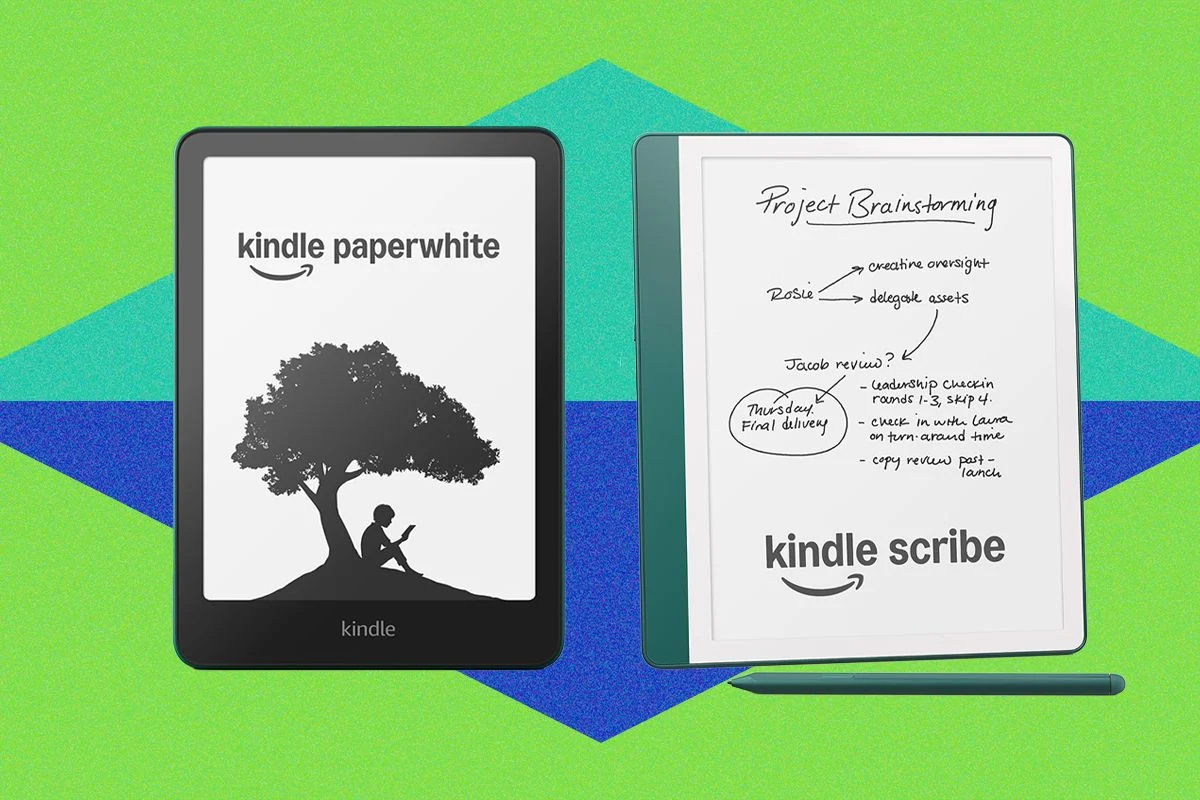
Amazon has significantly expanded its Kindle Scribe portfolio with three new models launched between late 2025 and June 2026, introducing color display technology and advanced AI capabilities. These new devices, the Kindle Scribe ($500), Kindle Scribe Colorsoft ($630), and Kindle Scribe Without Front Light ($430), aim to redefine the e-reading and note-taking experience, although experts suggest the previous generation might still offer better value. Complementing these releases, a range of accessories and cases are highlighted to enhance user comfort and device protection, while Amazon also provides crucial updates and advice for owners of older Kindle models.
The Latest Kindle Scribes: A Closer Look
The newly released Kindle Scribe models share a strikingly similar design aesthetic and software experience. Key enhancements across the board include a taller design featuring an expansive 11-inch screen, a slightly slimmer form factor, and an updated stylus for improved interaction. Under the hood, a new quad-core chip powers these devices, promising snappier performance. The user interface has also been refreshed with a new homepage, signaling a shift towards a more notebook-centric design, which the second-generation Scribe is slated to receive later this year.
A major leap forward for the new Scribes lies in their integration of artificial intelligence. All three models will support a variety of AI features, including an innovative AI search function. Furthermore, upcoming AI tools are expected next year, offering capabilities like summarizing books without revealing spoilers—a feature particularly appealing to avid readers and students. For productivity, the new Scribes now support direct connection to Google Drive and Microsoft OneDrive, enabling users to mark up documents seamlessly, a functionality absent in the older models.
Battery life, a hallmark of Kindle devices, varies among the new Scribe models. The Kindle Scribe (priced at $500) offers up to 12 weeks of reading time. The Kindle Scribe Colorsoft, while boasting a vibrant color screen, comes with a slightly reduced battery life of eight weeks. In contrast, the Kindle Scribe Without Front Light delivers an impressive 16 weeks of reading on a single charge. This model, however, is the most budget-friendly of the new Scribes at $430, while the Colorsoft, with its premium color display, commands the highest price tag at $630.
Despite these technological advancements, expert analysis suggests that the second-generation Kindle Scribe might remain a more attractive purchase due to its price point. While it lacks some of the cutting-edge AI features like AI search and the new notebook-forward homepage (though the homepage update is promised), it still offers robust note-taking capabilities. For users seeking advanced features at the higher price spectrum, digital notebooks from competitors like reMarkable are mentioned as potentially offering superior functionalities and accessories.
Essential Accessories for Enhanced Reading Comfort
For Kindle users who experience hand cramps during extended reading sessions, several accessories are recommended to improve comfort and usability. These tools are designed to provide support and better grip, making long reading sessions more enjoyable.
Protecting Your Device: Cases and Covers
While Kindles are generally less fragile than smartphones, protecting their screens from scratches and scuffs, especially when transported in bags, is advisable. A selection of cases and covers provides daily protection:
It’s worth noting that Kindle Kids’ editions typically come bundled with a protective case, eliminating the need for a separate purchase for those models.
Navigating Older Kindle Models: Advice for Buyers and Sellers
Amazon typically updates its Kindle lineup infrequently, leading to periods where older models may still be available. While these predecessors are not inherently unrecommended, potential buyers are advised to only purchase them if they find significant discounts and to always compare prices against the latest models to ensure fair value. Caution is also urged against acquiring excessively old models, as Amazon has begun to discontinue support for some of its earliest devices.
Specific older models and their recommended price ceilings when purchased secondhand include:
Key Information for All Kindle Users
Kindle Models with Discontinued Amazon Support: As of May 20, 2026, Amazon ceased supporting Kindle models released in 2012 or earlier. This means these devices can no longer access new books directly through Amazon’s services or be registered to an Amazon account. Users can still read existing books and manually transfer documents and books via USB cable or third-party software like Calibre. Affected models include the Kindle 2nd Generation (International), Kindle DX International, Kindle DX Graphite, Kindle Keyboard, Kindle 4th Generation, and Kindle 5th Generation.
Buying or Selling Older Kindles: To identify a specific Kindle model, Amazon provides a dedicated webpage with photos, specifications, and release years. Users with older Kindles may be eligible for Amazon’s trade-in program, offering credit towards a newer device. When considering used Kindles, it’s advisable to avoid models with physical keyboards or buttons beyond page-turn controls. Even if direct store access is lost on older models, books can still be purchased via Amazon’s website or app and sent to the device.
Accessing Free and Affordable Ebooks: To save on reading costs, users have several options:
Advanced Kindle Features: Kindles offer several useful functionalities:
Kindle Software Updates: Kindles automatically download and install new software updates when connected to Wi-Fi. Users can manually check for updates by navigating to Settings > Device Options > Advanced Options > Update Your Kindle.
Kindle Colorsoft Screen Discoloration: In 2024, some Kindle Colorsoft Signature users reported a yellow bar at the bottom of the screen and discoloration along the edges. Amazon has confirmed that customers experiencing this issue can contact customer service for a replacement or refund and stated that adjustments are being made to prevent this in new devices. While customer complaints persist, internal testing of the Colorsoft, Colorsoft Signature, and Scribe Colorsoft models has not encountered this issue.
Best Times to Purchase a Kindle: Significant discounts on Kindles are typically available during major sales events such as Amazon Prime Day, Black Friday, and Cyber Monday. These periods consistently offer reduced prices, making them ideal times for prospective buyers to make a purchase.
Kindles for Students: Kindles are highly suitable for students. Scribe models, with their stylus support for highlighting and note-taking, extended battery life, and compatibility with textbooks and library books, are excellent choices. For students primarily focused on reading without extensive note-taking, standard Kindle or Kindle Paperwhite models offer a portable and distraction-free reading experience.