 11

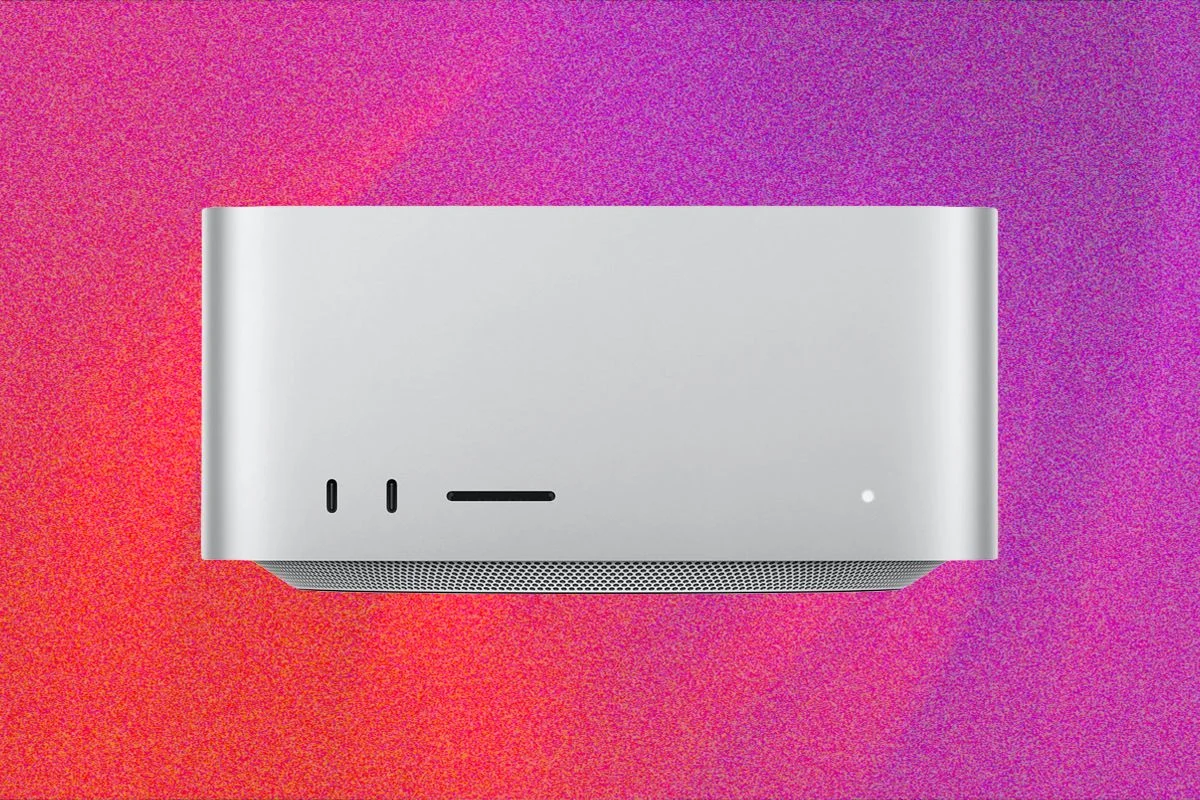
The Apple Mac Studio, particularly in its M5 Ultra configuration, is carving out a new and significant role in the computing landscape, moving beyond its initial perception as an overpowered machine for general professional use. With the accelerating demand for on-device artificial intelligence capabilities, systems boasting over 64 GB of unified memory and substantial GPU performance are now at the forefront of exploring a burgeoning ecosystem of local AI tools. The Mac Studio stands out as a formidable platform for deploying comprehensive agentic AI frameworks, executing high-fidelity video generation directly on the hardware, and running the most advanced foundation-level large language models (LLMs) offline. This capability positions the Mac Studio as a relatively unique offering in the current market, though it caters specifically to a user base deeply invested in the transformative potential of artificial intelligence.
At its core, the Mac Studio is a testament to Apple’s enduring commitment to high-performance computing, now critically optimized for the demands of local AI processing. The physical design of the device is remarkably compact for the immense power it houses. Standing approximately as tall as a standard coffee mug, its 7-inch square footprint belies its internal might. Many encountering a Mac Studio in person for the first time are often surprised by its substantial, yet desk-friendly, dimensions.

Connectivity remains a strong suit for the Mac Studio. Notably, it preserves two USB-A ports, a feature increasingly rare on modern Macs, catering to users with legacy peripherals. These are complemented by four high-speed Thunderbolt 5 ports, offering expansive bandwidth for external drives, displays, and other demanding accessories. Further connectivity includes an Ethernet port for reliable wired networking, an HDMI port for display output, and a dedicated headphone jack. A key differentiator from the Mac Mini is the inclusion of a front-facing full-sized SD card slot, a thoughtful addition that significantly benefits photographers and videographers who frequently transfer media. The system’s robust display support allows for up to four 5K external displays to operate simultaneously at a smooth 120 Hz via its Thunderbolt and HDMI ports, providing an expansive visual workspace for professionals. While its current silver finish is standard, a Space Black option would certainly appeal to a broader aesthetic preference.
The Mac Studio is available in two primary versions, each targeting distinct professional needs. The M5 Max model begins at $2,499, equipped with a solid 36 GB of unified memory and 512 GB of internal storage. This configuration is meticulously designed for content creators, game developers, and media professionals, offering performance comparable to a 16-inch MacBook Pro with the M5 Max chip, but at a substantially lower price point—a difference of approximately $1,250 when similarly configured. Furthermore, the Mac Studio provides greater flexibility in storage and memory expansion compared to its laptop counterpart.
However, the pinnacle of the Mac Studio lineup is the M5 Ultra configuration, which represents the model primarily under review. The tested unit, priced at an imposing $11,000, featured the M5 Ultra processor and a staggering 256 GB of unified memory. This top-tier model, while expensive, is not even the highest possible configuration, with a 512 GB memory option slated for release in October. The M5 Ultra chip is Apple’s most powerful and complex silicon to date, marking its debut as a quad-die chip. It ingeniously integrates two M5 Max chips through a high-speed interconnect, resulting in a formidable 36-core CPU. This level of specialized engineering positions the M5 Ultra Mac Studio as a highly targeted device, akin to Apple’s $3,299 Studio Display XDR in its niche appeal.

The true strength of the Mac Studio, regardless of configuration, lies in its immense number of GPU cores and its unified memory architecture. Users can configure memory from 36 GB up to 256 GB, with the 512 GB option expanding these capabilities further. Up to 80 GPU cores are available in the M5 Ultra. The consensus is that memory exceeding 64 GB is primarily beneficial for AI enthusiasts and developers, making this version of the Mac Studio particularly exciting for that demographic. While previous generations offered up to 256 GB of unified memory, the M5 Ultra significantly enhances GPU performance, doubling the GPU cores of the M5 Max and matching the M3 Ultra, but with two generations of architectural improvements making each core more efficient in both gaming and AI workloads. A critical enhancement across the entire "M5" family of chips is the inclusion of a Neural Accelerator within each GPU core, specifically designed to boost AI workload performance.
Performance benchmarks vividly illustrate the M5 Ultra’s capabilities. In certain scenarios, it achieves nearly double the performance of the M5 Max. While single-core CPU benchmarks show marginal differences, the doubled CPU cores of the M5 Ultra Mac Studio enabled it to outperform an M5 Max MacBook Pro (18-core CPU, 40-core GPU, 48 GB memory) by an impressive 51 percent in Cinebench 2026. GPU performance, while not scaling perfectly, was still 32 percent faster. When these processing powers converge, as in gaming, the M5 Ultra’s superiority becomes even more pronounced. The industry-standard 3DMark Steel Nomad benchmark recorded a 41 percent higher score for the M5 Ultra.
In real-world gaming scenarios, the Mac Studio delivers a genuinely impressive experience. It can run Cyberpunk 2077 at a remarkable 160 frames per second on the M5 Ultra, representing a 61 percent increase over the M5 Max. Optimal settings found for smooth gameplay were 2560 x 1400 resolution on Ultra settings, which renders the game with incredible visual fidelity, especially on an HDR screen like the Studio Display XDR. Even at native 4K resolution, the game runs at a respectable 53 fps at the same preset, offering players flexibility in their preferred visual experience. While the Mac Studio is not a direct competitor to high-end gaming PCs equipped with GPUs like an RTX 5090, it marks a significant leap, bringing Mac gaming closer to the performance levels of dedicated gaming rigs than ever before.

However, the primary allure of the M5 Ultra Mac Studio lies in its capacity for on-device AI workflows. The massive unified memory capacity is critical, but the M5 Ultra’s superior memory bandwidth—1.2 TB per second compared to the M3 Ultra’s 89 GB per second—is equally crucial for efficient local model execution. To test its AI prowess, a simple agentic AI task was set up in LM Bionic to summarize a dozen local files using a relatively small 9-billion-parameter Qwen 3.5 model. The M5 Ultra completed this task in a mere 2 minutes, a stark contrast to the almost 10 minutes required by the M5 Max MacBook Pro. The true revelation came with a much larger, 122-billion-parameter version of Qwen 3.5. The speed was astonishing, providing a user experience akin to interacting with a frontier-class LLM directly on the machine, entirely offline and without relying on cloud services. This local processing capability ensures privacy and allows for access to machine resources. Replicating the same agentic task with the larger model, it still finished in under 2 minutes, yielding significantly more accurate and useful results.
For graphics-intensive AI tasks, such as on-device image and video generation in applications like Draw Things, the 80-core GPU was put to the test. Using the MiniMax H3 model, generating a 15-second video locally took over 11 minutes. This indicates that while promising, local video generation still has a considerable journey before it can viably compete with cloud-based alternatives or dedicated high-powered discrete GPUs like the Nvidia RTX 5090 or 5080 for speed. The investment required to run such AI tasks locally on this machine remains a niche endeavor, but as AI models become more efficient and quality improves, the M5 Ultra Mac Studio’s capabilities are poised to grow. These are still the nascent stages of on-device AI.
During these intensive AI workloads, the Mac Studio’s thermal management system became evident. The device can become quite warm under full load, making it inadvisable to touch it or place objects on its top surface. Adequate clearance behind the unit is also recommended, as it expels a significant amount of hot air through its rear vents. The cooling fans can spin up to an audible level, though, characteristic of modern Macs, they typically take a couple of minutes to reach their peak speed. Despite the internal heat, the front-facing ports remain cool, thanks to the strategically placed vents in the thermal system directly beneath the Mac Studio’s chassis.

The Mac Studio occupies a unique position in the market. Many mini Windows PCs rely on laptop-grade chips, which typically restrict them to a maximum of 64 GB of RAM. This is where the top-end M5 Ultra Mac Studio truly excels and, from this perspective, justifies its premium price. The upcoming option for 512 GB of unified memory, coupled with the ability to link four Mac Studios to function as a single, massively powerful computer, creates an extremely specialized, yet currently unrivaled, solution for specific, high-demand professional and AI-centric workflows.
However, the base M5 Max Mac Studio faces stronger competition. For instance, the Geekom A9 Mega Mini PC, priced at $2,399, offers 64 GB of RAM, 1 TB of storage, and features AMD’s new Ryzen AI Max+ 388 chip. This competitor provides more memory and storage for less money and, crucially, employs unified memory in a similar fashion to Apple Silicon, which is essential for efficient local AI processing. Real-world comparisons will be crucial to fully assess its competitive stance.
The competitive landscape is also set to evolve with the imminent arrival of Nvidia’s RTX Spark "superchips." These new offerings promise up to 128 GB of unified memory for both laptops and mini PCs. While they may not yet match the Mac Studio’s 256 GB or future 512 GB memory options, they are expected to intensify competition in the high-performance Windows and Linux mini PC segments. For now, the Mac Studio, particularly the M5 Ultra variant, represents a powerful and specialized solution for the bleeding edge of local AI and demanding professional tasks, offering a tantalizing glimpse into the future of personal computing.