 11
11 1
1 2
2 3
3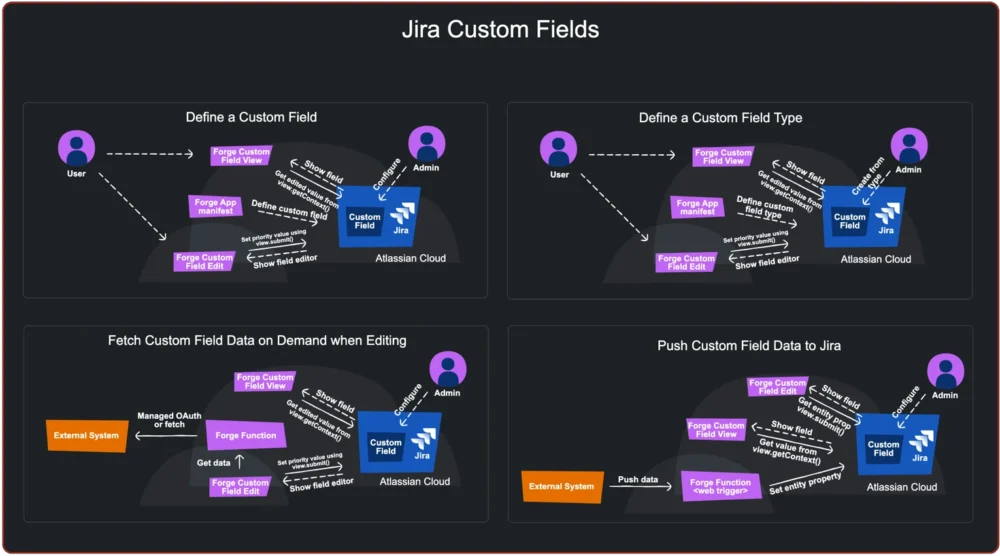
Software architecture patterns define standardized, battle-tested solutions to recurring problems within the development lifecycle, serving as a blueprint for building reliable and scalable applications. Within the Atlassian ecosystem, the adoption of these architectural patterns often improves robustness, performance, and overall usability, ensuring that applications meet the rigorous demands of enterprise environments. Beyond technical efficiency, these patterns establish a shared technical vocabulary that makes a codebase significantly easier for multi-functional teams to maintain and scale over time. By following established structures, developers can avoid common pitfalls, reduce technical debt, and ensure that their extensions to the Atlassian suite remain performant as user bases grow.

This comprehensive overview outlines various patterns relating to the architecture of Forge apps, Atlassian’s next-generation cloud development platform. These patterns are categorized into distinct sets to illustrate their interrelationships and to provide a logical framework for developers to follow. By understanding these groupings, developers can better navigate the complexities of cloud-native development and choose the right tools for specific use cases.
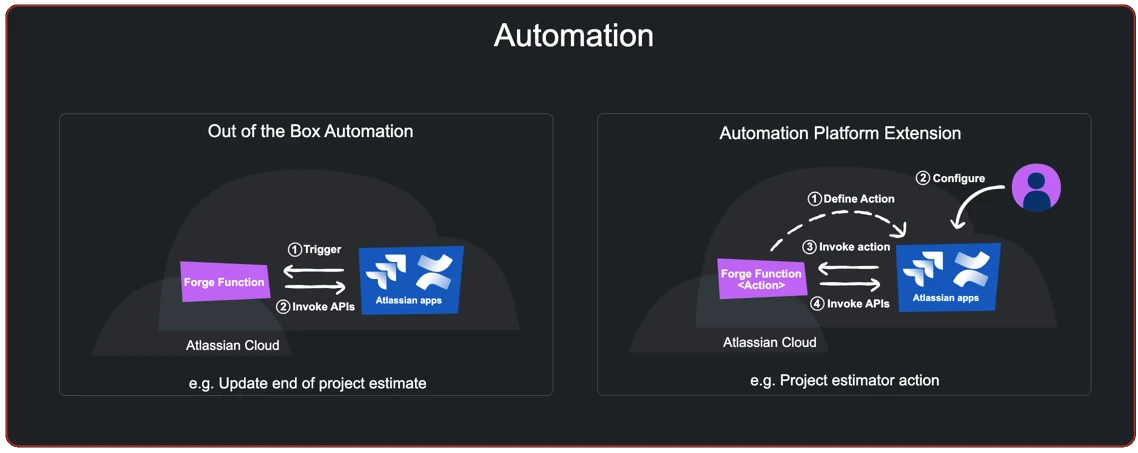
The primary value proposition of the Forge platform lies in its inherent ability to extend Atlassian applications, such as Jira and Confluence, in a way that feels native and secure. Forge apps can add or tailor user experiences, integrate Atlassian products with third-party systems, and automate complex tasks and processes. The first set of architectural patterns focuses on the fundamental methods for extending Atlassian apps. This includes the use of the Forge UI Kit and Custom UI. The UI Kit provides a declarative way to build user interfaces using a library of pre-defined components, ensuring consistency with Atlassian’s design language while minimizing the need for complex frontend management. In contrast, Custom UI allows developers to bring their own frontend stack, such as React or Vue, providing maximum flexibility for complex, bespoke user experiences. Additionally, this set includes the use of product triggers and webhooks, which allow apps to react to specific events within the Atlassian host application, such as the creation of an issue or the updating of a page.

Automation represents a significant subset of extension capabilities. By implementing automation patterns, developers can remove manual overhead for end-users and ensure data consistency across workflows. The automation set of patterns includes scheduled triggers, which allow apps to run logic at specific intervals—similar to traditional cron jobs—and product-based event triggers that initiate background processing without requiring direct user interaction. These patterns are essential for building "set-and-forget" tools that handle data synchronization, cleanup, or notifications behind the scenes. For instance, an automation pattern might be used to periodically scan Jira issues for overdue deadlines and automatically transition them to a "Critical" status while notifying the assigned stakeholder.
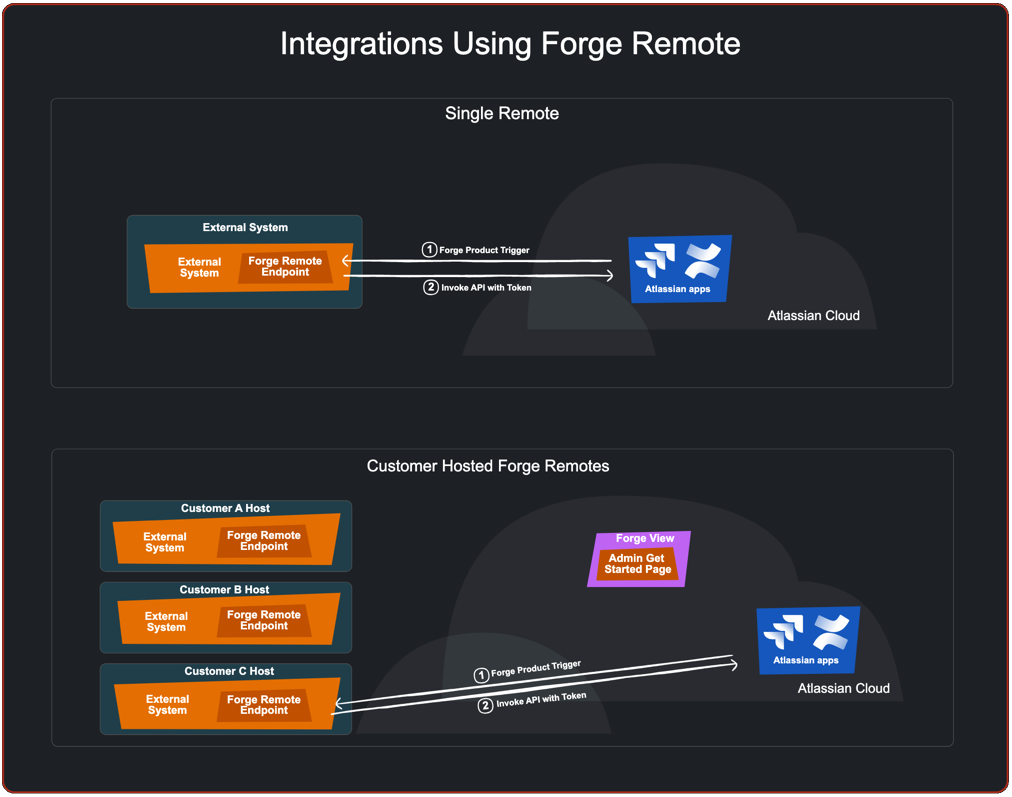
Integration is another cornerstone of the Forge ecosystem, particularly when connecting Atlassian apps with external third-party systems. Many Forge apps operate by pulling data from or pushing data to external APIs. There are two primary approaches to this: integration without Forge Remotes and integration using Forge Remotes. When integrating without Forge Remotes, apps typically rely on the native Forge "fetch" API to communicate with external endpoints. This pattern often involves managing authentication via OAuth 2.0 (3LO) or basic auth, and utilizing Forge Storage to persist configuration or state information locally within the Atlassian infrastructure. This approach is highly secure and keeps the majority of the app logic within the Atlassian-managed environment, reducing the operational burden on the developer.
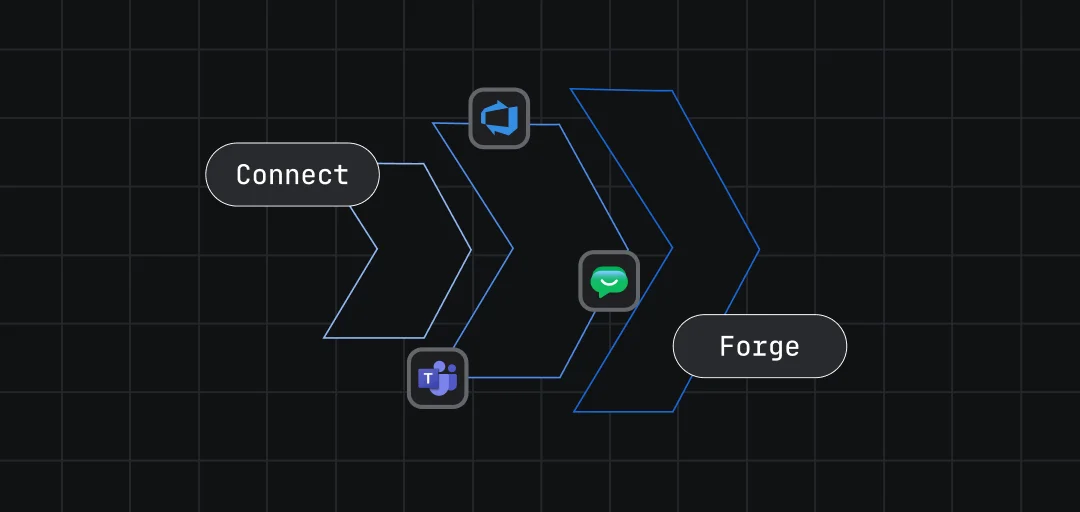
However, for more complex scenarios, Atlassian provides the Forge Remote pattern. Forge Remote allows developers to integrate a Forge app with external systems where specific aspects of the app are deployed to the developer’s own infrastructure, such as AWS, Azure, or private servers. This is particularly useful for applications that require specialized compute resources, access to legacy databases, or the use of programming languages not natively supported by the Forge FaaS (Function-as-a-Service) runtime. In this architectural pattern, the external system receives and responds to events from Atlassian apps or the Atlassian-hosted components of the Forge app. Forge Remote acts as a secure bridge, ensuring that even when logic is executed externally, the app still benefits from Atlassian’s identity management and security protocols.
A specialized area of extension involves the Jira workflow engine. Jira’s workflow capabilities are highly configurable, and Forge apps can extend these via specific extension points: conditions, validators, and post-functions. Workflow conditions are used to determine if a transition should even be visible to a user based on specific criteria. Validators check that the input provided during a transition is valid before the transition is allowed to complete. Finally, post-functions execute logic after a transition has successfully occurred, such as updating a field or sending an external notification. These patterns allow developers to bake business logic directly into the lifecycle of a Jira issue, ensuring that processes are followed correctly and that data integrity is maintained at every step of the project management journey.

Beyond workflows, Forge apps provide several ways to define and implement Jira custom fields. Custom fields are essential for capturing specialized data that does not fit into Jira’s default schema. Architectural patterns for custom fields include the use of Forge-hosted fields that render custom UI elements directly within the issue view. These patterns also cover the indexing and searching of custom field data. Developers can choose between read-only fields that display calculated data or interactive fields that allow users to input information via custom widgets. By utilizing these patterns, developers ensure that their custom fields remain performant and searchable, even in Jira instances with millions of issues.
To support these high-level functionalities, developers often rely on utility patterns. While a utility pattern on its own may not provide direct customer value, these patterns are designed to be composed like modular building blocks—or "Lego bricks"—to form the robust solutions that users interact with. Utility patterns include methods for state management, data caching, rate limiting, and error handling. For example, a data synchronization utility pattern might handle the complexity of retrying failed API calls or managing pagination when fetching large datasets from an external source. By isolating these shared features into utility patterns, developers can maintain a cleaner codebase and ensure that common technical challenges are handled consistently across different parts of the application.
These patterns are not intended to be an exhaustive list of every possible configuration, but they cover the vast majority of scenarios that customers and partners are likely to encounter when building on the Forge platform. One of the most powerful aspects of these architectural patterns is that they are intentionally composable. A single, sophisticated app will often combine several patterns to deliver its full functionality. For instance, a complex integration app might use a Custom UI pattern for its configuration screen, a Forge Remote pattern to process data on a private server, and a Jira post-function pattern to trigger updates back into a Jira issue once the external processing is complete.
Understanding this high-level map of what is possible with Forge provides developers with more than just technical guidance; it provides a shared vocabulary for discussing app architecture during the design and review phases. Each pattern warrants a deeper dive into specific implementation guidance, including the trade-offs between different approaches and specific usage notes regarding performance and security. By adhering to these battle-tested solutions, the developer community can continue to build high-quality, reliable extensions that enhance the Atlassian ecosystem for millions of users worldwide. As Forge continues to evolve, these patterns will serve as the foundation upon which the next generation of enterprise-grade cloud applications is built.