 11

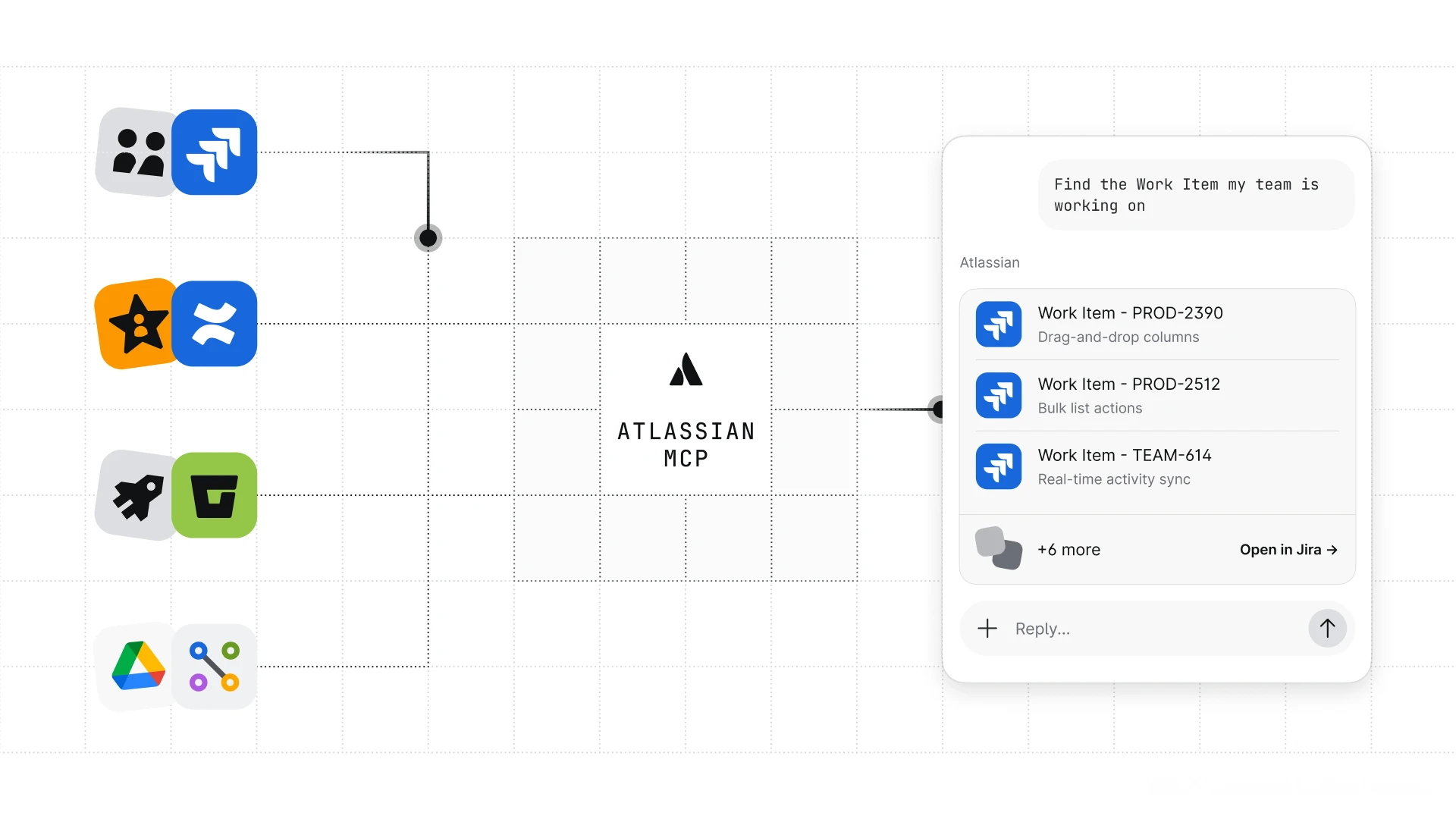
In a significant move to bolster the capabilities of artificial intelligence within the software development lifecycle, Atlassian has announced that Bitbucket Agentic Pipelines now integrates with a redesigned Atlassian Model Context Protocol (MCP) server. This update specifically targets agents powered by Anthropic’s Claude and OpenAI’s Codex, providing them with a more robust and secure framework to interact with Bitbucket, Jira, and Confluence. While the update represents a major shift for these specific AI models, Atlassian confirmed that Rovo Dev CLI agents will continue to utilize the original version of the Atlassian MCP server for the time being, remaining unaffected by this immediate change.
The integration of the redesigned MCP server is a foundational step in Atlassian’s broader strategy to enable "Agentic" workflows—autonomous or semi-autonomous AI agents that can perform complex tasks such as code reviews, pull request generation, and documentation updates within a CI/CD environment. By standardizing how these agents communicate with Atlassian’s suite of tools, the company aims to reduce the friction developers face when implementing AI-driven automation.
One of the primary technical enhancements introduced with this update is the overhaul of how agents authenticate with Bitbucket Cloud. In the previous iteration, developers often had to manage complex token configurations to ensure agents had the necessary permissions. With the new integration, when a pipeline step executes an agent, Bitbucket Pipelines automatically establishes a connection to the Atlassian MCP server.
This connection utilizes a short-lived, repository-scoped OAuth token. This "just-in-time" authentication mechanism ensures that agents only have access to the specific repository where the pipeline is running, significantly reducing the security risks associated with long-lived personal access tokens or broadly scoped credentials. Under this new system, the ATLASSIAN_MCP_API_TOKEN variable is no longer required for Bitbucket-specific operations, as the system handles the handshake natively.
The level of access granted to an agent is now governed directly by the auth.system.scopes definition within the bitbucket-pipelines.yml configuration file. By default, every pipeline step retains the ability to read its own repository. However, developers can now layer additional granular permissions as needed. These include:
read:repository:bitbucket and write:repository:bitbucket.read:pullrequest:bitbucket and write:pullrequest:bitbucket.read:pipeline:bitbucket and write:pipeline:bitbucket.To simplify the interface for the AI agents, Bitbucket Pipelines automatically maps these granular scopes to two broader categories used by the MCP server: read:bitbucket:agent-interface and write:bitbucket:agent-interface. This abstraction allows the agent to utilize a variety of tools under a single umbrella scope without requiring the developer to manually configure every individual API endpoint.
While Bitbucket access is handled automatically, Atlassian has maintained a flexible path for agents that need to interact with the broader Atlassian ecosystem, including Jira and Confluence. To facilitate this, developers can utilize a user-defined variable named ATLASSIAN_MCP_API_TOKEN.
By populating this variable with a scoped API token, the agent gains the ability to query Jira tickets for context, update Confluence documentation based on code changes, or link pull requests to specific project management tasks. If an agent’s workflow is strictly confined to Bitbucket, the ATLASSIAN_MCP_API_TOKEN can be left empty, and the pipeline will rely solely on the built-in OAuth token for repository tasks. This separation of concerns allows DevOps teams to adhere strictly to the principle of least privilege, ensuring agents only have access to the data necessary for their specific function.
Security in an AI-driven environment requires more than just API scopes; it requires control over the specific actions an agent takes. To address this, the redesigned MCP server integration introduces fine-grained tool permissions. This is implemented through a two-step verification process that involves both the AI provider configuration and the pipeline definition.
First, the AI provider (Claude or Codex) must be configured to prompt for MCP tool access. For Claude agents, this involves modifying the .claude/settings.json file to include specific permissions for executeWrite operations. Similarly, Codex agents require an update to the .codex/config.toml file to set the approval_mode to "prompt." This ensures that the agent cannot execute a write operation—such as merging a PR or deleting a branch—without the request first being filtered through the Bitbucket Pipelines permission engine.
Once the provider is configured to "ask," developers can define the answers to these prompts within the bitbucket-pipelines.yml file using the permissions.on-ask syntax. This framework allows for three primary configurations:
For example, a security-conscious team might allow an agent to perform most write operations but explicitly deny the ability to create new pull requests or interact with specific Jira projects. This is achieved through pattern matching, such as denying mcp__atlassian_v2__executeWrite(name:*Jira*). It is important to note that these rules control tool availability and execution logic; they do not replace or grant API scopes, which must still be handled via the authentication layer.
As with any major architectural shift, Atlassian has acknowledged that the redesigned MCP server does not yet support every feature available in the legacy version. Currently, certain specialized tools remain exclusive to the older server. To prevent workflow disruptions, Atlassian has introduced a fallback mechanism. Developers whose workflows rely on currently unsupported tools can opt to use the legacy MCP server by setting the use-legacy-mcp flag to true in their agent configuration.
However, Atlassian has signaled that this is a temporary measure. The company plans to retire the use-legacy-mcp option in a future release once the remaining gaps in tool coverage are closed. Teams are encouraged to begin testing their Claude and Codex agents with the redesigned server (use-legacy-mcp: false) to ensure a smooth migration once full tool parity is achieved.
Regarding Rovo Dev CLI users, the current update maintains the status quo. Rovo Dev agents continue to use the legacy Atlassian MCP server and possess built-in connectivity to Jira and Confluence. In most standard configurations, Rovo Dev determines access based on the USER_API_TOKEN provided for the agent step. However, if a developer wishes to override this with a specific token for Jira and Confluence, the ATLASSIAN_MCP_API_TOKEN variable can be used as a high-priority override.
Looking ahead, Atlassian has confirmed that Rovo Dev CLI is slated to transition into the "Rovo CLI" as part of a broader product evolution. While Agentic Pipelines will continue to support the Rovo Dev CLI in the interim, a formal migration path to the new Rovo CLI is expected to be shared in the coming months.
To get started with these new features, Atlassian recommends that developers update their bitbucket-pipelines.yml files to include the necessary auth.system.scopes and configure their agent providers to support the new prompting logic. The company has updated its technical documentation and support pages to provide detailed examples of the new YAML syntax and permission structures.
For teams seeking assistance or wishing to provide feedback on the new integration, Atlassian has directed users to the Bitbucket Questions board within the Atlassian Community. Technical support remains available for enterprise customers navigating the migration from legacy MCP configurations to the redesigned server. This update marks a pivotal moment for Bitbucket Cloud, as it matures from a traditional CI/CD platform into an AI-augmented development environment capable of supporting the next generation of autonomous engineering tools.