11

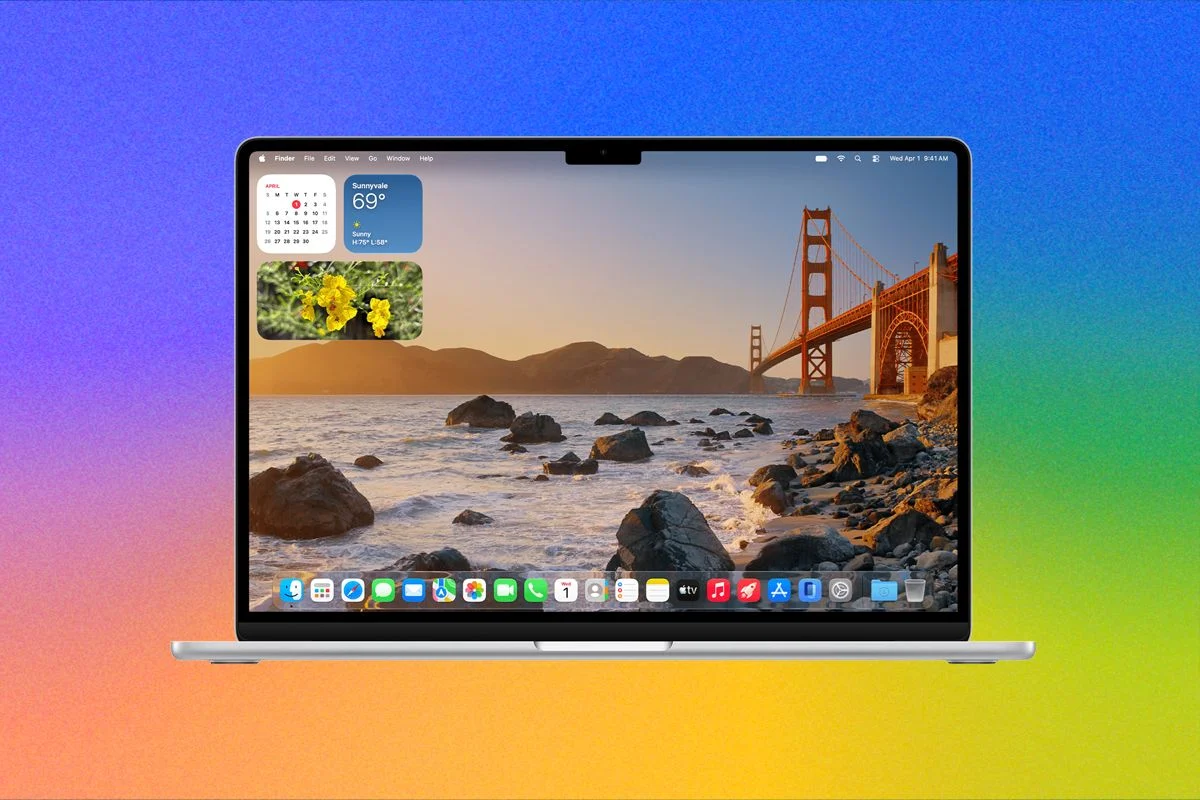
Apple’s latest iteration of its Mac operating system, macOS 27 Golden Gate, officially launched on September 14, following its grand announcement at the Worldwide Developers Conference (WWDC) in June. This highly anticipated update is now available for download on compatible Mac devices, marking a significant step in Apple’s commitment to integrating artificial intelligence across its ecosystem. The standout feature of Golden Gate is undoubtedly the introduction of Siri AI, representing Apple’s first serious and comprehensive endeavor to embed advanced AI capabilities deeply within the macOS experience. Having been in testing for several months, the software update is now accessible to the wider public, with initial hands-on impressions updated in September 2026.
Compatibility Requirements for Golden Gate
A crucial aspect for users considering the upgrade is compatibility. macOS 27 Golden Gate is exclusively designed for Apple Silicon Macs. This follows Apple’s prior announcement that macOS 26 Tahoe would be the final update to offer support for Intel-powered Macs, signaling a complete transition in Apple’s desktop operating system strategy. While a comprehensive list of supported devices will be provided by Apple, users can generally expect M1, M2, and M3 series Macs to be compatible.
However, it is important to note that some of the more advanced Apple Intelligence features, particularly the improved Voice Mode within Siri AI, demand higher processing power. These cutting-edge modes specifically require an M3 Mac or newer, coupled with a minimum of 12 GB of RAM. This hardware prerequisite means that several older Apple Silicon models, such as the MacBook Neo and a substantial number of MacBook Air models released before 2024, will not be able to fully leverage the most sophisticated AI functionalities. This distinction underscores Apple’s push for advanced on-device AI processing, which benefits from the latest neural engine and unified memory architectures in its newer chips.
Furthermore, a significant geographical caveat applies to Siri AI: it is currently English-only. More critically, its immediate availability in the European Union (EU) and China is restricted due to ongoing regulatory concerns surrounding data privacy and AI governance. This phased rollout strategy highlights the complexities Apple navigates in deploying advanced AI technologies globally.

Seamless Installation Process
For users eager to experience the new features, the installation process for macOS 27 Golden Gate is straightforward. While a beta version of Golden Gate has been accessible since July, the official public release is now deemed stable and safe for installation. To initiate the update, users simply need to navigate to System Settings (previously System Preferences) on their Mac. From there, select General, and then proceed to Software Update. The macOS Golden Gate 27 update should appear, offering users the choice to either "Update Now" for immediate installation or "Update Tonight" to schedule the update for off-peak hours. As with any major operating system update, it is always recommended to back up your data before proceeding.
Introducing the Transformative Siri AI
Historically, Siri’s integration on Mac has often been perceived as secondary, lacking the seamless utility it offered on iOS devices. However, the new Siri AI in macOS Golden Gate aims to redefine this perception entirely. This advanced chatbot is meticulously tailored for the macOS environment, bringing a suite of powerful capabilities previously seen in its iOS and iPadOS counterparts. These include a dedicated Siri AI app for more complex interactions, screen awareness that allows Siri to understand on-screen context, automatic proofreading for text, personal context derived from user data, and a significantly improved, customizable voice experience.
At its core, the new Siri AI is powered by Apple Foundation Models, which are notably based on Google Gemini technology. This strategic partnership grants Siri AI vastly improved natural language processing capabilities, enabling more fluid and intelligent conversations. Furthermore, it incorporates the latest advancements in computer vision and image-generation models, making Siri more versatile than ever. For many Mac users who might be hesitant to directly engage with standalone AI chatbots like ChatGPT, Siri AI is poised to become their primary introduction to modern AI, seamlessly integrated into their daily computing tasks.
Despite the excitement, Siri AI is currently in a beta phase and is not activated by default. Within Settings, a message indicates that Siri AI is "being rolled out gradually." This cautious approach by Apple suggests a desire to ensure a stable and high-quality experience before a full public release. Initial reports online mentioned some users gaining immediate access, clearing the waitlist within minutes. However, many, including the reviewer, experienced longer wait times, extending for almost an entire day without specific information from Apple regarding the waitlist’s extent or expected duration for beta access.

Once access is granted, Siri AI becomes systemwide, dramatically enhancing its utility. It can be invoked from virtually anywhere on the desktop via a simple right-click in the context window. For instance, users can select multiple files in Finder, right-click, and then select Siri AI to start prompting directly within the Siri AI application, asking it to summarize, rename, or organize files. The intelligence is also being built into Spotlight. Previously a powerful search tool, Spotlight will now automatically route more complex, question-based queries to Siri AI, opening a chat window to facilitate a continued conversation. Additionally, Siri now boasts Visual Intelligence on the Mac; capturing a screenshot allows users to immediately pull up Siri and prompt it to answer questions about or take direct action on the image content, such as extracting text or identifying objects. For a deeper dive into Siri AI’s functionalities across platforms, Apple provides comprehensive breakdowns of its new features.
Apple Intelligence Enhances Core Applications
The profound integration of Apple Intelligence extends beyond Siri AI itself, permeating various first-party Apple applications to enhance user workflows.
Safari, Apple’s web browser, receives one of the most substantial updates. Building upon its tab group feature introduced in 2021, Safari now introduces "Topics." This AI-powered feature intelligently analyzes open tabs and automatically groups them into coherent topics, streamlining organization. Users can then easily close these topics or save them as dedicated tab groups for future reference, significantly improving browser management for power users. Another intriguing addition is Custom Extensions, allowing users to create browser extensions using natural language commands. While the theoretical potential is vast, the practical, valuable use cases for this feature are still being explored by early adopters. Safari also gains a native Notify Me feature, providing desktop notifications when specified webpages are updated. This is particularly useful for tracking price changes on products or monitoring news updates, offering a convenient, built-in alternative to third-party tools. Finally, Safari leverages the Passwords app to automatically identify and recommend fixes for website login passwords deemed insecure.
The Shortcuts app, which received initial AI upgrades last year, is further revolutionized. Users can now design complex automated shortcuts using natural language, eliminating the need for manual connection of functions between different applications. Apple’s example illustrates this power: typing, "Whenever I’m leaving work, calculate the ETA, and send it to Pedro," would automatically trigger a sequence combining Maps for route calculation and Messages for communication.
Calendar also benefits from natural language processing, allowing users to create events by simply describing them. The app will then intelligently fill in details such as contacts and locations based on the input.

Image Playground, Apple’s image-generation tool, receives a major overhaul, now powered by Google’s Gemini image-generation technology. This update significantly expands its capabilities, enabling the creation of photorealistic imagery and offering greater flexibility. Users can now generate images in landscape or portrait aspect ratios and iteratively edit their AI creations, refining details with successive prompts. While the app is still considered niche and its "photorealistic" outputs may not yet match the sophistication of leading models from ChatGPT or Gemini, it offers a powerful creative tool within the Apple ecosystem. Like other image-generation services, Image Playground is subject to daily generation limits, with iCloud+ subscribers having the option to purchase additional generations.
Refinements to the Liquid Glass Interface
Beyond AI, macOS 27 Golden Gate also serves as a crucial refinement release following last year’s macOS Tahoe, which introduced the visually distinctive "Liquid Glass" user interface. Golden Gate addresses feedback and complaints regarding the initial implementation, particularly concerns about indecipherability and cluttered menus due to excessive transparency. The new update introduces a subtle but effective refraction effect within the transparency, which more strongly obscures background content. This thoughtful design choice makes foreground text and UI elements significantly easier to read, enhancing overall clarity and user experience. Upon installing macOS Golden Gate, users are greeted with a new Liquid Glass slider, allowing for immediate customization of this effect.
The reviewer found a preference for around the 75 percent mark, striking a balance between maintaining the aesthetic effect and ensuring readability. This setting, along with others, can be fine-tuned in System Settings > Appearance. For users who prefer a more traditional, opaque interface, the option to almost entirely disable the effect in areas like the Menu Bar and Dock remains available through the Accessibility > Display > Reduce Transparency setting.
Apple has also implemented several smaller, yet impactful, visual refinements. The Toolbar now features a uniform menu design, contributing to a more cohesive look. Sidebars have been extended to the very edge of their respective windows, maximizing screen real estate. Furthermore, icons within the sidebars have regained their color, providing better visual cues and a more vibrant interface. While Apple had promised that every window would finally have the same consistent corner radius as the window control buttons, the reviewer noted some remaining inconsistencies, such as in the Safari settings window. Predictably, many third-party applications, like Google Chrome, have yet to update their designs to match Apple’s new aesthetic.
Beyond visual tweaks, Apple reports underlying performance improvements in responsiveness. These include optimizations in memory usage, CPU utilization, display rendering, and app switching. On the Mac, specific examples include more fluid transitions between Spaces and a snappier experience when opening Mission Control, contributing to a more polished and responsive operating system.

Enhanced HDR and External Monitor Support
Two notable features in macOS 27 that were not highlighted during WWDC pertain to display technology.
Firstly, Golden Gate introduces systemwide utilization of XDR panel capabilities. Apple’s MacBook Pro displays and Studio Display XDR monitors are renowned for their high dynamic range (HDR) support, but this extra brightness typically only engages when viewing HDR content such as movies, videos, or games. With macOS 27, this HDR capability is now subtly employed systemwide within certain UI elements. Users will observe a slight increase in brightness in the highlights of Liquid Glass-enhanced icons and buttons, providing a more visually dynamic interface. While not a dramatic change, it represents a clever way to leverage the advanced display technology for everyday use.
Secondly, Apple’s official review documentation indicates updated external monitor support in macOS 27. The system now supports "additional high-resolution and high-refresh-rate display modes for external displays," with the stated purpose of providing "more options to match your monitor’s full capabilities." While specific details from Apple are still pending, this update is particularly intriguing. Currently, Macs do not officially support monitors exceeding 240 Hz refresh rates. The potential expansion of support to 360 Hz or even 480 Hz would be a significant development, especially for professional gamers, eSports enthusiasts, and content creators who demand the highest refresh rates for optimal performance and fluidity. Further information on the precise capabilities and supported display modes is anticipated and will be updated as it becomes available.