 11
 1
 2
 3
The advent of "vibe coding" has undeniably streamlined the creation of static websites, enabling developers to launch sites with frameworks like Astro, Jekyll, Gatsby, or Hugo without the necessity of traditional Content Management Systems (CMS). However, this ease of development does not automatically translate to ease of optimization. Unlike established CMS platforms such as WordPress, which often handle fundamental SEO tasks like canonicalization, sitemaps, redirects, metadata, schema, and 404 error management through plugins and built-in functionalities, static sites place a greater onus on the developer to manage these crucial elements.
Industry experts Suganthan Mohanadasan, Pedro Dias, and Ryan Law, drawing from their extensive experience in building and working with static sites, have highlighted common pitfalls that can arise. As Suganthan aptly puts it, "Going static doesn’t remove SEO work; it moves it, in my opinion. WordPress hides a load of defaults behind plugins, and static turns every one into a job you do yourself." This shift in responsibility necessitates a thorough understanding of the SEO functionalities previously managed by a CMS and the proactive implementation and monitoring required for a static environment.
Static websites, while capable of remarkable speed and technical cleanliness, also present a broader surface area for minor SEO oversights. The absence of an underlying CMS or automated SEO plugins means that more tasks become manual responsibilities. This is particularly relevant in the context of "vibe-coded" sites, where AI can construct pages, but may not inherently adhere to site-wide SEO conventions without explicit guidance.
Several common SEO issues emerge on static sites, requiring diligent attention:
Trailing Slash and Canonical Conflicts: Discrepancies between website hosts (e.g., Netlify) and static site frameworks (e.g., Astro) regarding the presence or absence of trailing slashes in URLs can lead to duplicate URLs. This can fragment ranking signals and create confusion for search engines. The solution involves establishing a consistent URL convention (with or without a trailing slash) and configuring both the framework and hosting environment to adhere to it, ensuring canonical tags and internal links point to the correct version. Tools like Ahrefs’ Site Audit can identify these conflicts, redirect chains, and non-canonical internal links.
Sitemap and Noindex Conflicts: Sitemaps generated by code on static sites may inadvertently include pages marked with noindex directives. This can lead to the indexing of draft content, thank-you pages, or other unintended URLs. The absence of a CMS plugin to maintain synchronization means that pages excluded from navigation or marked noindex might still appear in the sitemap or RSS feed unless specific exclusion logic is implemented. As sites grow, managing complex sitemap rules can become challenging. Furthermore, a robots.txt file may not be automatically generated, necessitating manual creation and configuration to ensure proper crawling rules are in place. It’s crucial to remember that robots.txt controls crawling, not indexing. Experts recommend establishing a single rule for pages to be excluded from search (e.g., noindex: true) and ensuring sitemap and RSS feed generators honor this directive. Regular re-evaluation of exclusion logic is advised. Ahrefs’ Site Audit can cross-reference sitemap URLs with indexability signals to detect discrepancies.
Unoptimized Images: While some static site frameworks offer built-in image optimization tools, this is not a universal feature. Frameworks like Jekyll, for instance, may copy image files without automatic resizing, compression, or format conversion, requiring plugins, CDNs, or pre-publishing processing. Even when tools exist, they often only function when images are integrated through the framework’s specific pipeline. Using standard <img> tags or dropping raw image files can bypass these optimizations, resulting in larger file sizes, slower load times, and missing alt text. The visual appearance of a page in a preview might not reveal these underlying performance or accessibility issues. Consistent use of the framework’s image components or optimization pipelines, coupled with checks for oversized images and missing alt text before publishing, is recommended. Ahrefs’ Site Audit offers dedicated reports for identifying image-related SEO problems.

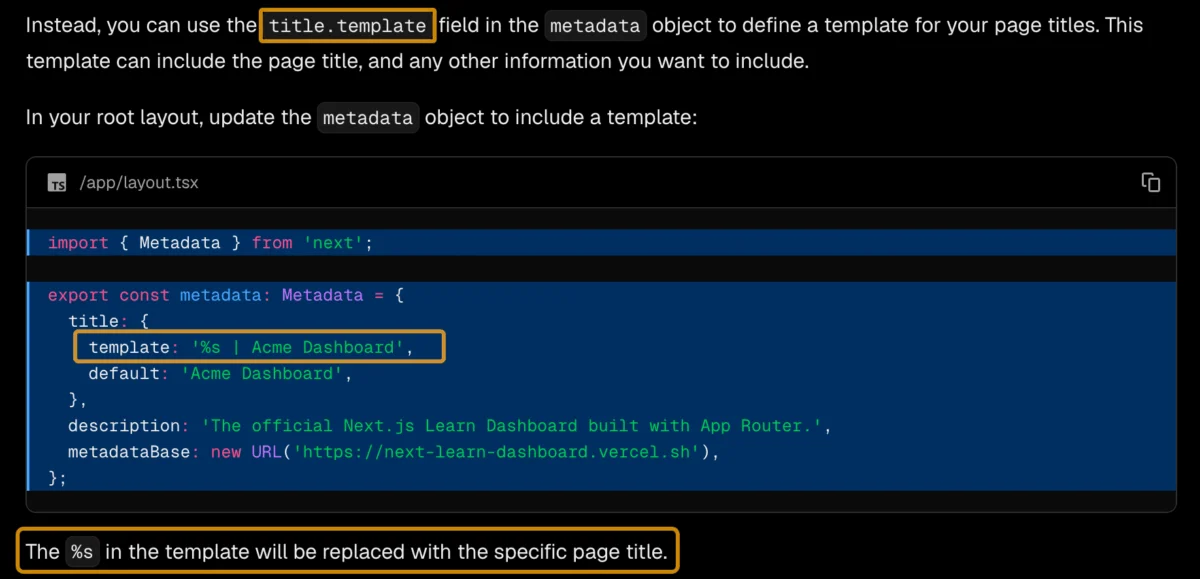
Template-Driven Metadata and Schema Errors: Titles, meta descriptions, canonical tags, and schema markup on static sites are frequently generated from shared templates. While efficient for management, a single error in a template can propagate across hundreds of pages. For instance, automatically appending a brand name to every title could exceed optimal length limits. Similarly, incorrect schema types or missing properties in a template can lead to widespread issues. Unlike CMS plugins like Yoast SEO, which provide dedicated interfaces for managing these rules, static sites often require direct template coding. This convenience can be a double-edged sword, as a flawed default can spread rapidly. Vibe coding can exacerbate this by generating metadata or schema that appears acceptable but doesn’t align with specific page types or structures. The recommended approach involves defining metadata and schema requirements per page type before template creation and rigorously testing multiple pages using the template after any changes. Google’s Rich Results Test is a valuable tool for validating schema markup.
Incorrect HTTP Status Codes: A critical issue arises when a page displays a "404 – Page not found" message to users but returns a 200 OK status to search engines. This can occur due to improper 404 handling at the framework or hosting level, leading to "soft 404s." Google may interpret these pages as existing content despite their user-facing error messages. Developers must ensure that non-existent URLs genuinely return a 404 status code, not just display a visually similar error page. Testing non-existent URLs and verifying the HTTP response code is essential. Ahrefs’ Site Audit can identify URLs returning unexpected status codes, including soft 404s.
Internal Linking Inconsistencies: Static sites can develop inconsistent internal links, particularly when different templates or AI-generated components construct URLs with minor variations (e.g., with or without trailing slashes, or mixing relative and absolute URLs). While each format may not be inherently wrong, inconsistencies arise when they deviate from the site’s chosen URL convention. This can lead to unnecessary redirects, inefficient crawling, and diluted internal linking signals. The solution lies in establishing a single, consistent URL format and applying it across all templates, navigation, and links. Utilizing shared link components or helper functions can prevent manual URL entry errors. Crawling the site to detect internal links pointing to redirects or non-canonical URLs is crucial.
Technical Performance Issues: The assumption that static sites are inherently fast can be misleading. Excessive JavaScript or CSS, unoptimized third-party scripts, or inefficiently loaded resources can still degrade performance. Vibe-coded sites, in particular, may accumulate scripts, libraries, and animations without adequate consideration for their cumulative performance impact. Developers must scrutinize technical decisions, including JavaScript and CSS usage, asset loading strategies, and the impact of third-party integrations. Tools like PageSpeed Insights are vital for assessing Core Web Vitals, and site audits can uncover performance problems across multiple pages.
Migration-Specific SEO Pitfalls: Migrating from a CMS to a static site can introduce unforeseen SEO challenges, even if the new pages appear visually identical. A website migration often entails the loss of redirects, sitemap rules, metadata logic, schema, and other SEO configurations managed by the previous CMS. URL changes without proper 301 redirects are a significant risk, leading to the loss of valuable links and ranking signals. Treating the transition as a comprehensive SEO migration, including pre-launch audits of redirects, sitemaps, metadata, and legacy assets, is paramount.
The question of which static site framework is "best for SEO" is nuanced. Frameworks like Astro, Next.js, Gatsby, Hugo, and Jekyll can all support robust SEO, but the required effort varies. Elements such as canonicals, Open Graph tags, schema, sitemap rules, and noindex handling necessitate configuration across all platforms. Image handling is an area where frameworks exhibit more distinct differences in built-in capabilities. Ultimately, the effectiveness of SEO on a static site hinges more on the quality of configuration and development practices than on the specific framework chosen. The crucial question for businesses is whether their needs align with the capabilities of a static setup, with smaller sites and infrequent updates being strong candidates, while large-scale publishing operations might benefit more from the integrated functionalities of a CMS.
In conclusion, while static sites and vibe coding offer significant advantages in development speed and control, they also demand a greater level of SEO responsibility. The "SEO plumbing" that a traditional CMS often handles behind the scenes must be actively managed by the developer. This includes meticulous attention to canonicals, sitemaps, redirects, schema, performance, and status codes. Vibe coding accelerates the build process, but it does not diminish the fundamental requirement to understand and implement sound technical SEO principles.