11

The landscape of Continuous Integration and Continuous Deployment (CI/CD) is undergoing a significant transformation as artificial intelligence becomes deeply integrated into the software development lifecycle. Atlassian’s Bitbucket has announced a series of pivotal updates to its Pipelines platform, specifically designed to lower the barrier for implementing AI agents and to reduce the complexity of YAML configurations. These updates, collectively referred to as "Agentic Pipelines," aim to solve the persistent issue of configuration overhead that has previously hindered the widespread adoption of AI-powered development tools. By introducing centralized workspace settings for AI agents and a new system for reusable step configurations, Bitbucket is prioritizing developer efficiency and organizational scalability.
For years, the promise of AI agents in development has been clear: they can autonomously investigate failed builds, suggest fixes for flaky tests, and automate repetitive tasks such as generating release notes or performing initial code reviews. However, the practical implementation of these agents often hit a wall of technical friction. Because AI agents typically require different compute resources, specific security permissions, and unique runtime environments compared to standard build or test steps, developers were forced to manually configure these parameters for every single instance where an AI agent was utilized. This led to a choice between two suboptimal paths: either developers would repeat complex blocks of YAML code across multiple pipeline files, increasing the risk of "configuration drift," or they would attempt to force a single set of global defaults onto every step, often resulting in inefficient resource allocation or permission errors.
Bitbucket’s latest release directly addresses these pain points by improving both the administrative and the technical aspects of the pipeline experience. The goal is to provide a much shorter path from the initial enabling of an AI agent to the moment it begins delivering useful work to the development team. The first major component of this update is the ability for workspace administrators to enable built-in AI agents directly from the workspace settings. This centralized approach allows organizations to standardize their AI strategy across all repositories within a workspace without requiring individual repository owners to write complex boilerplate code.
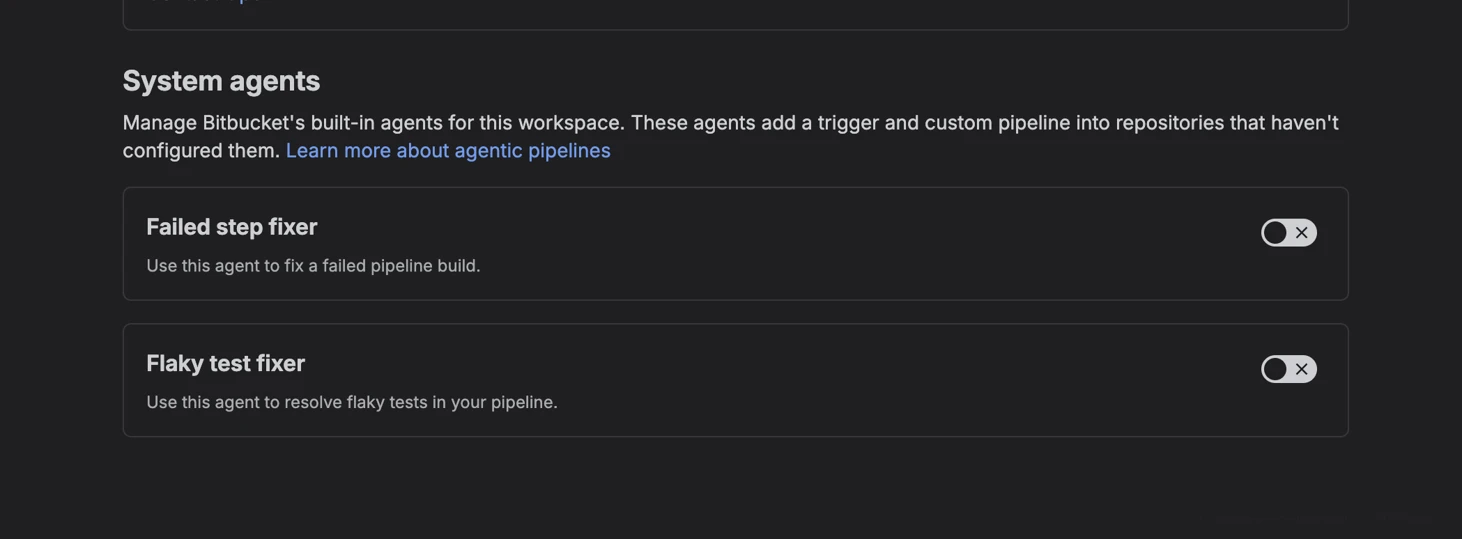
Within the Bitbucket interface, workspace administrators can now navigate to Workspace settings, then to the AI section, and finally to Agentic Pipelines. From this dashboard, admins can toggle on Bitbucket’s built-in AI agents. While the system currently highlights two primary agents—the Release Note Generator and the PR Reviewer—the infrastructure is built to support a growing ecosystem of agentic tools. When an admin enables these agents at the workspace level, Bitbucket automatically supplies the necessary underlying configuration required for those agents to function. This "out-of-the-box" readiness eliminates the need for teams to research and manually input the specific environment variables or compute requirements for Atlassian’s native AI tools.
Despite this centralized control, Bitbucket has ensured that individual repositories maintain the necessary autonomy to adapt to specific project needs. While the workspace provides a sensible starting point, a repository can still customize the default runtime used by built-in agents. This includes the ability to override the build image, adjust the step size (compute resources), or disable an agent’s trigger entirely if a specific project does not require its services. This hierarchical model balances the need for organizational consistency with the flexibility required for diverse software projects.

Complementing the workspace-level AI settings is the introduction of reusable step configurations. This is a fundamental shift in how Bitbucket Pipelines handles YAML definitions, moving away from repetitive declarations toward a more modular, "Don’t Repeat Yourself" (DRY) architecture. A step configuration is essentially a named set of Pipelines options that can be defined once and then referenced across multiple steps throughout the pipeline file. This feature allows teams to define the image, size, caches, services, permissions, and other runtime settings in a single "definitions" block.
The impact of this change is most visible when comparing "before" and "after" YAML structures. Previously, if a team wanted to run two different AI agents—one for release notes and one for code reviews—they would have to define the environment for both steps separately, even if those environments were identical. This resulted in redundant blocks of code where the image version and the compute size (such as 2x) were repeated multiple times. Under the new system, these shared settings are consolidated under a single configuration name, such as "agents." In the actual pipeline steps, the developer simply references the "config: agents" label. This not only makes the YAML file significantly shorter and more readable but also ensures that any future updates to the environment—such as upgrading the default build image—only need to be made in one place to take effect across all relevant steps.
Importantly, these reusable step configurations are not limited to AI agents. While they are a cornerstone of the Agentic Pipelines initiative, they are a general-purpose improvement that can be applied to any recurring build, test, or release task. A development team might maintain a standard configuration for Node.js builds, another for AWS deployments, and a third for security scanning. By using these named configurations, teams can ensure that every security scan across their entire project uses the exact same permissions and image, reducing the likelihood of human error or security gaps caused by inconsistent configuration.
The synergy between built-in agents and reusable configurations creates a powerful workflow for modern DevOps teams. When a workspace admin enables a built-in agent, Bitbucket provides the agent itself. If a repository has defined a default reusable step configuration, the built-in agent will automatically adopt those repository-specific settings when it executes. This ensures that even "automated" agents respect the specific resource constraints and environment standards established by the repository owners. It removes the "black box" feel often associated with automated tools, as the execution parameters remain explicit and reviewable within the pipeline’s YAML definition.
This update represents Atlassian’s broader commitment to "AIOps"—the application of artificial intelligence to enhance IT operations. By reducing the "YAML tax" that developers often pay when trying to innovate, Bitbucket is making it easier for teams to experiment with and deploy AI-driven automation. The reduction in duplicated configuration does more than just save time; it improves the maintainability of the codebase. In large-scale enterprise environments where hundreds of repositories might share similar pipeline requirements, the ability to manage configurations through reusable definitions and centralized toggles is a significant step toward operational excellence.
For teams looking to get started with these new features, the process begins in the administrative settings of the Bitbucket workspace. By enabling the built-in agents, teams can immediately begin to see the benefits of automated PR reviews and release documentation. Simultaneously, developers can begin refactoring their bitbucket-pipelines.yml files to take advantage of the definitions and step-config blocks. As development tasks become increasingly complex, the move toward modular, agent-aware CI/CD infrastructure will likely become the standard for the industry. Bitbucket’s Agentic Pipelines provide the framework for this transition, ensuring that as AI agents become more capable, the systems used to deploy them remain simple, transparent, and easy to manage. Through these enhancements, Atlassian is not just adding new features but is fundamentally refining the developer experience to be more intuitive and less burdened by manual configuration.