 11
11 1
1 2
2 3
3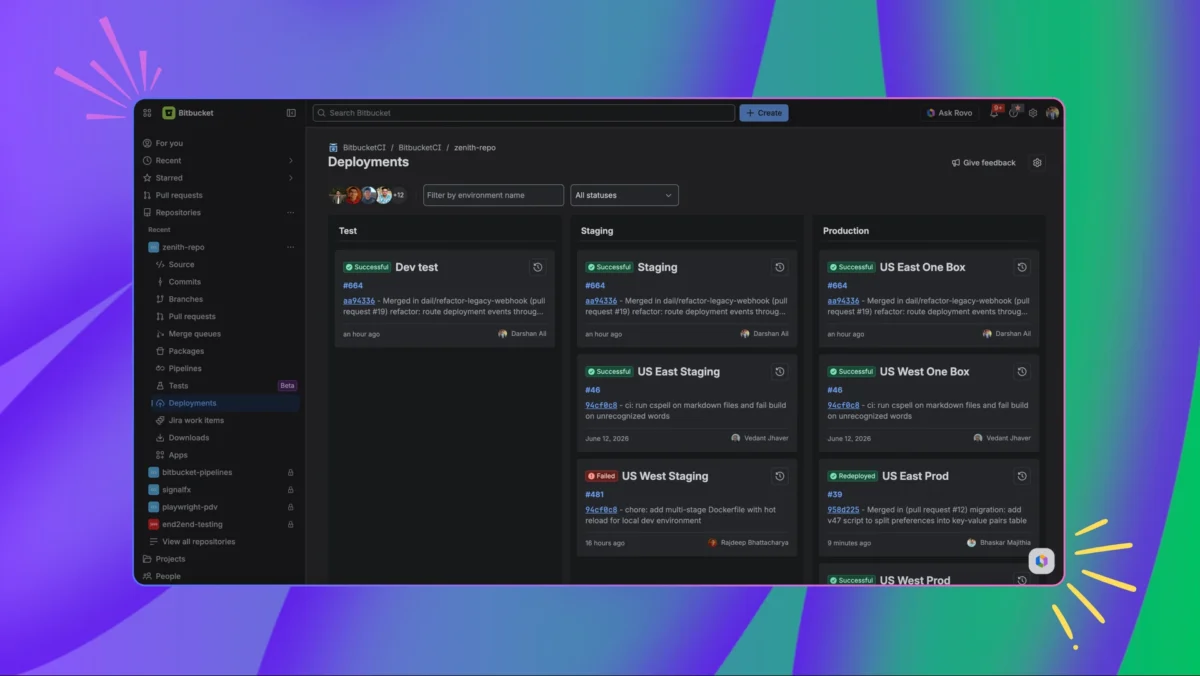
Atlassian has officially launched a comprehensive redesign of the Bitbucket Pipelines Deployments page, a critical interface used by software engineering teams to monitor the progression of code from development to production. The update addresses long-standing challenges regarding dashboard clutter and cognitive load, providing a more intuitive, high-performance environment for tracking software releases. As modern software development increasingly relies on Continuous Integration and Continuous Deployment (CI/CD) practices, the visibility of deployment statuses has become paramount. This refresh is designed to ensure that developers and operations teams no longer have to navigate complex, disorganized interfaces to determine the current state of their software environments.
The central thesis of the redesign is the elimination of "information hunting." In the previous iteration of the Deployments page, teams often found it difficult to quickly ascertain which version of a codebase was active in specific environments, such as testing or staging. The new experience prioritizes clarity and speed, organizing information in a way that surfaces the most critical data points immediately. By streamlining the interface, Atlassian aims to reduce the time spent on manual checks and increase the time teams spend on high-value development tasks.
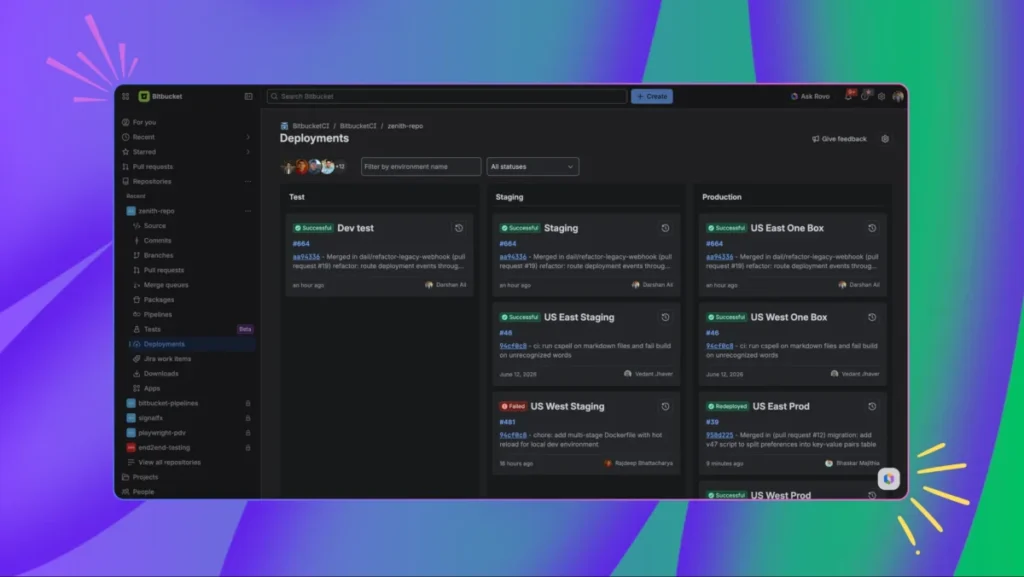
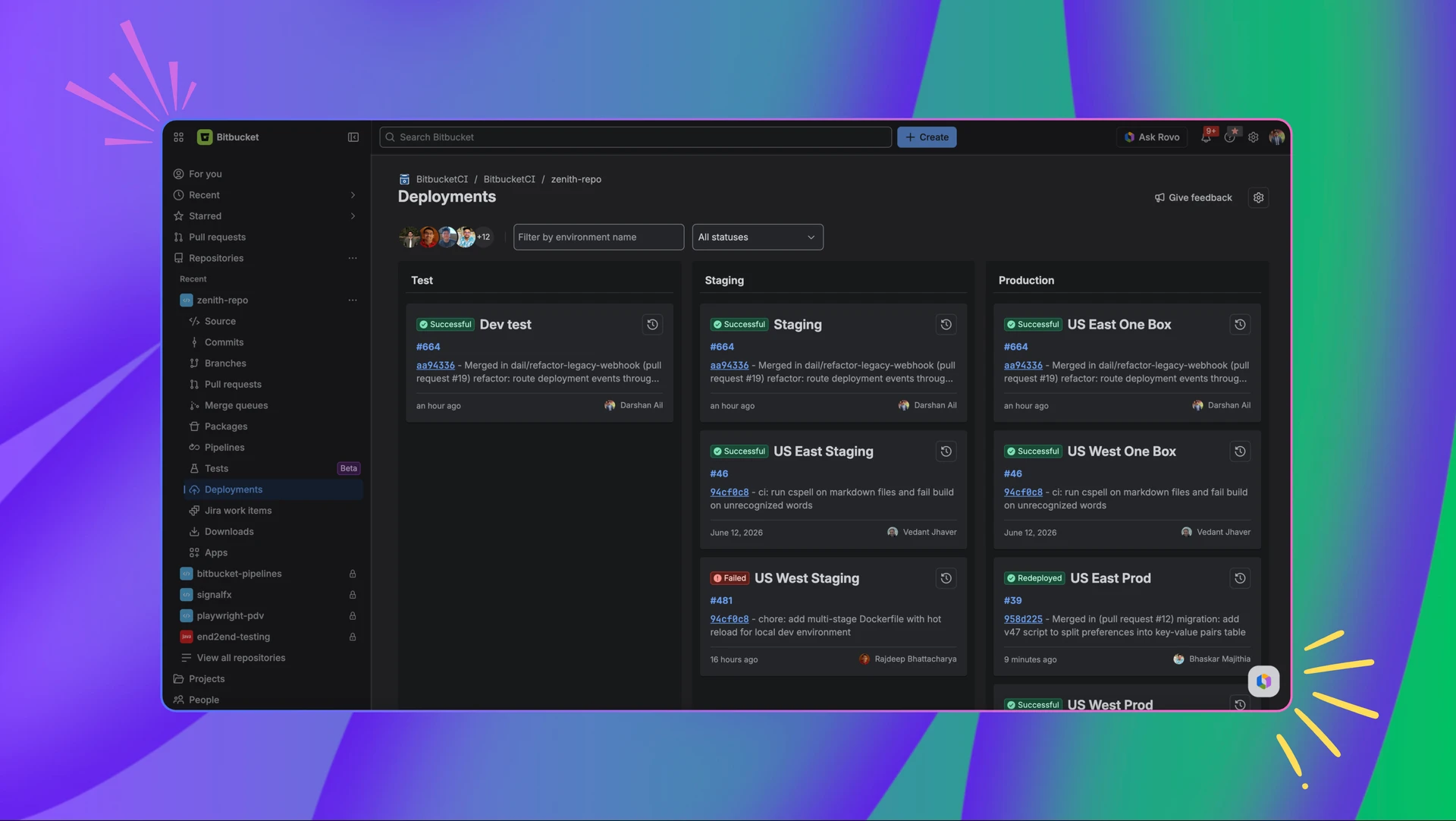
One of the most significant structural changes is the introduction of a cleaner, column-based layout. The new interface categorizes environments into three distinct, standardized columns: Test, Staging, and Production. This organizational logic reflects the standard industry pipeline, allowing users to understand the relationship between different environment types at a glance. A key improvement in this layout is its predictability; the columns maintain their structure even when they are empty. This ensures that the page layout remains consistent across different projects and repositories, allowing for better muscle memory and faster scanning by users who manage multiple pipelines simultaneously.
In addition to the structural overhaul, Atlassian has introduced advanced filtering capabilities to help teams isolate specific information within seconds. As software projects grow in complexity, the number of active environments and deployments can become overwhelming. The new filtering system allows users to narrow down results using combined parameters, such as environment types or specific deployment statuses. This capability is particularly beneficial for large-scale enterprises where hundreds of deployments may occur daily. By providing the ability to filter out noise, the new Deployments page enables leads and managers to focus on the specific environments that require immediate attention or intervention.
The granularity of information provided on the dashboard has also been significantly enhanced through the introduction of richer deployment cards. Each environment is now represented by a single, redesigned card that consolidates the most pertinent information into a unified view. Within these cards, users can now view the status of the deployment, the specific timestamp of the last action, the version or build number, and the author of the deployment. By centralizing these details, Atlassian has removed the need for users to click through multiple layers of the interface to find out who pushed a specific change or when a production environment was last updated.
Recognizing the importance of historical context in troubleshooting and auditing, the update also features an improved discovery mechanism for deployment history. Historically, viewing previous deployments often required navigating away from the main dashboard, leading to a loss of context. The new design solves this by integrating an explicit history access point within each deployment card. When activated, a history panel opens alongside the main page. This "side-by-side" view allows engineers to inspect recent deployment trends, compare previous versions, and identify when a specific issue may have been introduced, all without losing their place on the primary deployments overview.
A hallmark of the new experience is the implementation of live, real-time updates. In the fast-paced world of DevOps, waiting for a browser to refresh to see the status of a critical production deployment can be a source of frustration and delay. The new Pipelines Deployments page now updates automatically as events occur within the pipeline. Whether a deployment is just starting, changing status from "in progress" to "successful," or encountering an error, the UI reflects these changes instantaneously. This real-time synchronization ensures that the entire team is looking at the "single source of truth" at all times, facilitating better communication and faster response times during deployment windows.
Looking toward the future, Atlassian has signaled that this redesign is only the beginning of a broader effort to move teams from monitoring status to taking direct action. The company is currently exploring integrations that would link the Deployments page directly to operational tools and runbooks. One specific area of focus is the integration with Splunk and other observability platforms. By connecting deployment data with operational logs and performance monitoring tools, Atlassian aims to reduce context switching further. In the future, a developer seeing a failed deployment on the Bitbucket dashboard might be able to click a direct link to the relevant Splunk logs or an internal runbook, significantly shortening the Mean Time to Resolution (MTTR).
For teams that have not yet adopted Bitbucket Pipelines for their deployment workflows, Atlassian has simplified the onboarding process. The system utilizes a YAML-based configuration, allowing teams to define their deployment logic as code. A standard bitbucket-pipelines.yml file can be configured to trigger deployments to specific environments automatically. For example, a branch-based trigger can be set up so that any code merged into the "main" branch automatically initiates a deployment step to the production environment. This "Configuration as Code" approach ensures that deployment processes are versioned, repeatable, and transparent to the entire development team.
The specific technical implementation for a production deployment in the YAML configuration is straightforward, as demonstrated by the following example provided by Atlassian:
image: atlassian/default-image:5
pipelines:
  branches:
    main:
      - step:
          name: Deploy to production
          deployment: production
          script:
            - echo "Deploying to production"
This snippet illustrates how the deployment: production keyword maps the pipeline step directly to the "Production" column in the new UI, ensuring that the visual representation on the dashboard perfectly matches the underlying automation logic.
Atlassian continues to emphasize the role of community feedback in its development cycle. The company has invited users to participate in the ongoing evolution of the Deployments page by sharing their experiences on the Atlassian Community forums. This feedback loop is intended to help the product team prioritize upcoming features and ensure that the tool meets the diverse needs of global engineering teams. Detailed support documentation is also available for teams looking to migrate their existing workflows to the new interface or those starting with Bitbucket Pipelines for the first time.
In summary, the redesigned Bitbucket Pipelines Deployments page represents a shift toward a more sophisticated, user-centric approach to DevOps visibility. By focusing on reducing cognitive load, providing real-time data, and maintaining structural consistency, Atlassian is providing teams with the tools they need to manage the increasing complexity of modern software delivery. The update not only improves the daily experience of developers but also sets the stage for deeper integrations with the broader IT operations ecosystem, reinforcing Bitbucket’s position as a central hub for the software development lifecycle.