 11
11
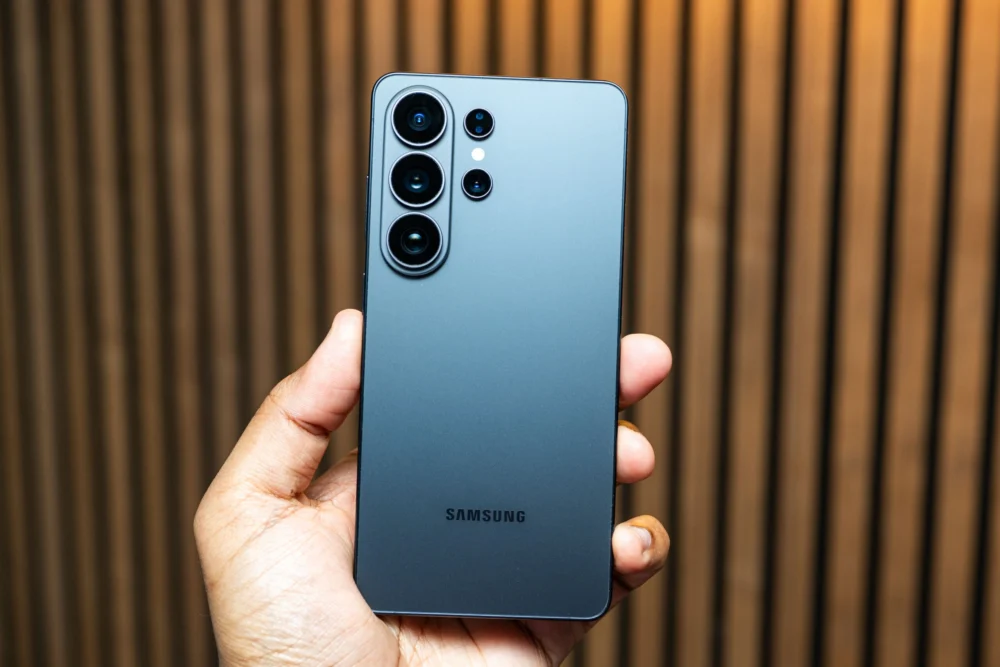
The Samsung Galaxy S26 Ultra introduces a groundbreaking hardware innovation in its Privacy Display, a feature that significantly enhances user comfort and security in public settings. This new technology is poised to redefine expectations for smartphone privacy, addressing a common concern in an increasingly digital world where personal information can be inadvertently exposed.
Imagine a scenario where your sensitive queries, private conversations, or financial transactions are inadvertently glimpsed by a commuting neighbor or a curious bystander. The Galaxy S26 Ultra’s integrated Privacy Display effectively mitigates this risk. Over two weeks of rigorous testing, the reviewer experienced a heightened sense of security, noting the difficulty for onlookers to discern screen content on public transport or in bustling coffee shops.

While the Privacy Display stands out as a genuinely revolutionary addition, the Galaxy S26 Ultra, in its broader scope, represents an iterative refinement rather than a radical overhaul compared to its immediate predecessors, the Galaxy S25 Ultra and S24 Ultra. For users owning a flagship Galaxy smartphone from the past one to three years, an upgrade at the premium price point of $1,300 may not be strictly necessary unless their current device faces significant issues. However, for those coming from older models, the S26 Ultra delivers a robust and well-rounded experience, excelling in several key areas.
The Screen: A New Era of Privacy
The most compelling aspect of the Galaxy S26 Ultra is its exclusive Privacy Display, a hardware feature seamlessly integrated into the screen itself. Unlike traditional privacy screen protectors that require manual application and often compromise screen brightness and image quality, Samsung’s solution offers a sophisticated alternative. It dynamically restricts viewing angles without dramatically degrading the display’s vibrancy or clarity when viewed head-on.

This integrated approach brings unparalleled flexibility. Users can customize when the Privacy Display activates, setting it to automatically engage for specific messaging applications, banking apps, or incoming notifications. Crucially, when looking directly at the phone, there is no visual cue indicating whether the Privacy Display is active, ensuring a seamless user experience. While the screen remains somewhat visible from extreme side angles, the content becomes significantly dimmer and much harder to decipher.
For situations demanding absolute discretion, a "Max Privacy Protection" mode is available via the quick settings menu. This mode renders the screen almost entirely unreadable from the sides, offering an exceptional level of privacy. However, this comes with a trade-off: the screen appears somewhat washed out even to the direct viewer, making it unsuitable for constant use. It’s a manual toggle, and currently, Samsung does not allow this extreme mode to be automated for specific applications, which is a minor inconvenience.
Despite some online discussions regarding potential screen quality degradation, the reviewer observed no fuzzy text or brightness issues, especially after maximizing the screen resolution to Quad HD+ and setting colors to Vivid. This integrated Privacy Display far surpasses conventional screen protectors. Traditional protectors offer constant privacy, which can be a hindrance when you wish to share content with a friend or family member sitting beside you, or simply want to glance at your phone from an angle while it rests on a table. Samsung’s intelligent solution provides the best of both worlds, offering privacy on demand without sacrificing everyday usability.
.jpg)
The utility of this feature extends beyond safeguarding illicit or highly sensitive information. It caters to fundamental needs for personal space and digital security – from keeping a private conversation with a loved one confidential, to preventing prying eyes from seeing authentication codes during a login, or ensuring bank account details remain unseen. The sheer convenience and peace of mind offered by this integrated privacy solution make it a desirable addition to any modern smartphone.
The Phone: Design, Performance, and Battery Life
Samsung has subtly refined the design of the S26 Ultra, aligning it more closely with the standard Galaxy S26 and S26+ models by adopting rounded corners, a departure from the boxier aesthetic of its predecessors. Despite this, the overall design language remains understated, and the muted color palette does not exude the vibrant excitement seen in some competitors, such as the orange variant of the iPhone 17 Pro. The integrated S Pen stylus, however, continues to be an exclusive and defining feature of the Ultra line, offering enhanced productivity and creative capabilities.
.jpg)
A minor ergonomic drawback is the phone’s pronounced wobble when placed on a flat surface. Although the S26 Ultra is slimmer, its camera module is thicker, leading to an awkward rocking motion when interacting with the screen while the device is tabletop. While a protective case can resolve this, many users prefer a caseless experience.
Another notable omission is the lack of native Qi2 magnetic wireless charging. The S26 series is "Qi2 Ready," meaning full access to faster wireless charging speeds and magnetic mounting requires a first-party or third-party magnetic case. This contrasts with Google’s Pixel 10 phones, which offer native Qi2 functionality, and Apple, which has integrated MagSafe/Qi2 even into its more affordable iPhone 17e. Samsung’s delay in adopting native Qi2 remains a point of concern for those seeking seamless cross-compatibility with a growing ecosystem of magnetic accessories.
Performance on the Galaxy S26 Ultra is exceptional, powered by the Qualcomm Snapdragon 8 Elite Gen 5 processor. Benchmark scores reached unprecedented highs for a smartphone, particularly in multi-core tests, closely matching the performance of devices like the OnePlus 15, which shares the same chip. In real-world usage, demanding games like Genshin Impact ran flawlessly at maximum graphical settings. While the reviewer noted slightly smoother gameplay on the iPhone 17 Pro, the S26 Ultra’s performance is largely without complaint. Furthermore, the phone effectively manages thermals, distributing heat evenly to prevent uncomfortable hot spots.

Battery life is a strong suit, thanks to the substantial 5,000-mAh cell. The device comfortably lasts a full day even under heavy usage, with the reviewer achieving seven hours of screen-on time on a busy day before needing to recharge. With average or light use, nightly charging becomes optional. Despite this impressive endurance, the absence of silicon-carbon battery technology, which some Chinese manufacturers are exploring for its potential to offer higher energy density and faster charging, is a missed opportunity for Samsung.
The Camera System: Versatility and Stabilization
The Galaxy S26 Ultra’s camera system emphasizes versatility, offering a comprehensive suite of lenses for diverse photographic needs. It features a high-resolution 200-megapixel main sensor and a 50-megapixel 5X optical zoom camera, both benefiting from slightly wider apertures. This enhancement results in brighter and sharper images, particularly in challenging low-light conditions. The quad-camera setup seamlessly transitions between ultrawide, 3X optical zoom, 5X optical zoom, and the main sensor, providing a highly enjoyable and intuitive shooting experience. The "optical-like" 10X zoom also delivers surprisingly good results, encouraging users to capture more photos.
.jpg)
While the S26 Ultra’s camera is highly capable, the reviewer expressed a slight preference for the Google Pixel 10 Pro’s color tones, exposure, and contrast. In low-light scenarios, users may encounter slightly blurry images if they are not sufficiently still. Nevertheless, the sheer breadth of options and the overall quality of the system make it a compelling choice.
For video enthusiasts, Samsung continues to set a high bar in the Android segment. The S26 Ultra introduces "Horizon Lock," a feature that, when manually enabled in Super Steady video mode, provides astonishing stabilization. Users can tilt, twist, and shake the phone significantly, yet the footage remains remarkably steady, even when shooting in 4K at 60 frames per second with HDR+. This allows for greater freedom in capturing dynamic scenes, though it performs optimally in well-lit environments.
The AI Features: Hits and Misses
.jpg)
The Galaxy S26 Ultra integrates a dual approach to artificial intelligence, combining Samsung’s proprietary Galaxy AI features with Google’s Gemini and other AI tools. Bixby remains present, and Perplexity is now preinstalled, indicating a multi-faceted AI strategy. Features like conversational editing in Samsung’s Gallery app now mirror capabilities already present in Google Photos, offering users choice and feature parity.
However, not all AI features are equally effective or useful. Samsung’s "Now Brief" widget, intended as a daily information hub, failed to provide valuable insights during testing. Similarly, "Now Nudge," designed to offer contextual assistance within Samsung’s keyboard (e.g., suggesting calendar events from text messages), rarely activated.
The Samsung Keyboard itself remains a significant point of frustration. Its voice typing struggles with punctuation and frequently mishears commands, while swipe typing is described as lackluster. This leads many users, including the reviewer, to switch to Google’s Gboard for a superior typing experience, raising questions about Samsung’s inability to improve this fundamental interaction despite its advancements in other AI areas.
.jpg)
On the more practical side, some AI features prove genuinely beneficial. The new call-screening function is effective, though the reviewer still encountered more suspected scam calls than on a Pixel 10 Pro. The upgraded document scanner within the camera app is highly useful, intelligently removing creases, erasing fingers, cutting away backgrounds, and minimizing distortion – representing the kind of "mundane" yet impactful assistance AI should provide. The "Audio Eraser" function is another pleasant surprise, adeptly cutting out background chatter from videos, making dialogue clearer and potentially aiding individuals with hearing difficulties.
The most impressive AI innovation is Google’s Task Automation in Gemini, making its debut on the Galaxy S26 Ultra (and slated for the Pixel 10 series). This feature allows users to delegate tasks to Gemini, such as "book an Uber" to a specified location, or order food from services like DoorDash, GrubHub, and Uber Eats. Gemini effectively takes control of the respective app, navigating menus and making selections. Users can visualize this process or let it run in the background, with Gemini pausing to ask clarifying questions before the final confirmation step.
While the Uber booking experience was smooth, it was slightly slower than manual operation. Food ordering presented more challenges; Gemini successfully inferred "Weng’s Garden" despite a misspelling and correctly identified "Chicken With Vegetables in Garlic Sauce" from a simpler query. However, initial attempts saw it incorrectly adding wings to a cart. Despite these minor imperfections, the ability of Gemini to handle such menial tasks, allowing users to simply verify the final order, represents a significant leap in conversational AI utility. It’s crucial, however, to acknowledge the inherent privacy and security risks associated with granting an AI complete control over applications.
.jpg)
Ultimately, the ability to disable most of these AI capabilities offers users control over their digital experience. The Samsung Galaxy S26 Ultra stands as an excellent smartphone, with its Privacy Display emerging as a rare, genuinely innovative feature that sets a new standard for mobile privacy. Looking ahead, continued enhancements to battery capacity and the long-awaited integration of native Qi2 for broader cross-compatibility with accessories remain key areas for Samsung to address in future iterations.