 11
11 1
1 2
2 3
3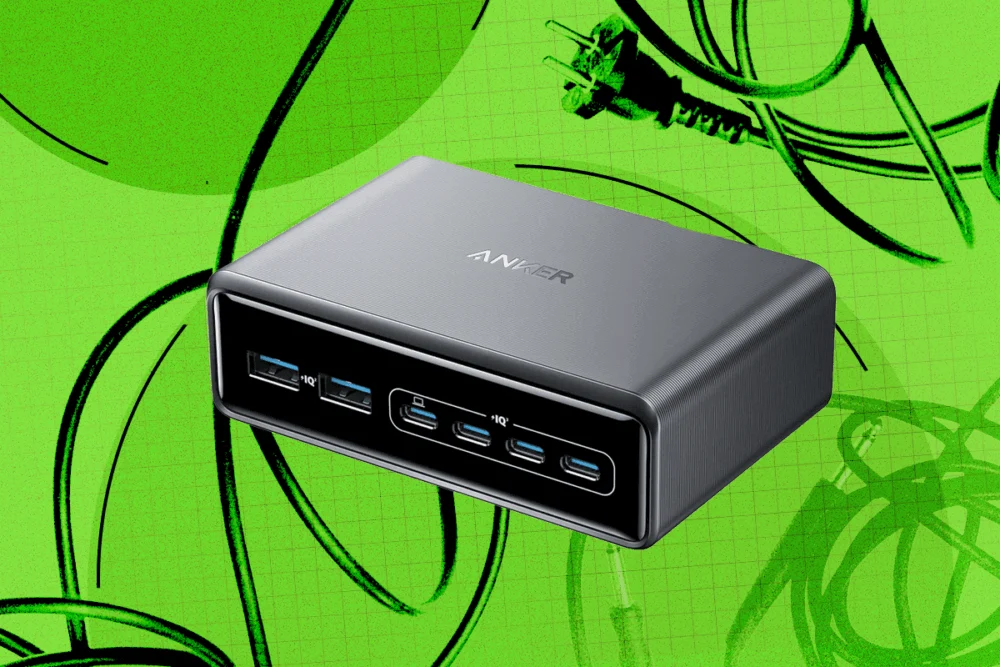
In an era defined by interconnectedness, the proliferation of electronic gadgets has brought unparalleled convenience but also a persistent challenge: managing the ever-growing tangle of cables, cords, and wires. As WIRED aptly highlights, the need for devices to be consistently plugged in can quickly transform an organized space into a chaotic nest. This article delves into a systematic approach to reclaim order from cable chaos, drawing on the disciplined strategies of a seasoned gadget reviewer and offering practical tips and product recommendations to achieve a clean, efficient, and aesthetically pleasing workspace.
Phase One: Planning and Preparation for a Seamless Setup
Effective cable management begins not with buying products, but with thorough planning and preparation. The first crucial step involves surveying the existing setup, a process that entails unplugging every device, meticulously untangling the current mess, and identifying any cables or adapters that are no longer in use. It’s often surprising to discover obsolete connectors, such as stray USB-B or Micro-USB cables, lurking within the jumble. Removing these unused items immediately reduces clutter and simplifies the subsequent organizational process.
Once the workspace is clear, a vital, yet often overlooked, step is cleaning. Dust and grime accumulate rapidly around electronic equipment and cables, not only contributing to an unclean aesthetic but also potentially impacting device performance and safety. Using a slightly damp microfiber cloth, carefully wipe down all surfaces – the desk, shelves, and even the cables themselves. For hard-to-reach areas and accumulated dust within device vents or power strips, a can of compressed air can be invaluable. This preparatory cleaning ensures that adhesive cable clips and ties will adhere properly and provides a fresh foundation for the new, organized arrangement.
With the workspace decluttered and cleaned, the strategic phase of planning routes can begin. Consider the proximity of devices to power outlets and each other. The goal is to route cables efficiently, minimizing unnecessary length and crossing paths. Grouping cables that travel the same general direction—for instance, all power cables to a surge protector, or all display cables from a monitor to a PC—will be key to creating neat bundles.
Cable length is a critical factor in achieving a truly tidy setup. Ideally, cables should be precisely the length required to connect devices without excessive slack. While this might necessitate investing in new cables, particularly for common connections like USB-C, the visual and functional benefits are substantial. Shorter cables mean less excess to hide, contributing significantly to a streamlined look. When purchasing new cables, prioritize reputable brands to ensure quality and durability.
For users with a standing desk, an additional layer of planning is essential. The dynamic nature of a height-adjustable desk means cables must accommodate both sitting and standing positions without tension or obstruction. Failure to account for the full range of motion can lead to severe consequences, such as cables disconnecting abruptly, or, as one reviewer learned firsthand, a DisplayPort cable pulling a PC tower into the air. Ensure generous slack or use specialized standing desk cable management solutions that move with the desk.
Phase Two: Implementing Effective Cable Management Solutions
Once planning is complete, various tools and techniques can be employed to keep cords neatly out of sight. Many modern desks are designed with integrated cable management features, such as built-in channels, grommets, and power strip trays. Take full advantage of these features, as they offer the most seamless and aesthetically integrated solutions. Similarly, some monitor arms incorporate cable management channels, allowing display and power cables to be routed discreetly along the arm itself, further reducing visible clutter on the desktop.
Beyond built-in features, a range of external products can transform a chaotic cable landscape:
Ikea Trixig 150-Piece Cable Management Set: This affordable and comprehensive kit offers a versatile array of cable clips. It includes three different sizes of clips, available with either nails for permanent fixtures or adhesive backs for more flexible placement, in both black and white finishes. This allows users to tackle various cable scenarios, from securing single wires along a desk leg to managing small bundles against a wall. Its low cost makes it an excellent starting point for anyone embarking on a cable management project.
Velcro-Style Cable Ties: Highly favored by many, including gadget reviewers, Velcro-style cable ties offer unparalleled flexibility and reusability. Unlike single-use zip ties, these adjustable fasteners can accommodate varying sizes of individual cables or thick bundles of multiple cords. Their ease of adjustment means reorganizing or adding new cables is a simple task, making them ideal for dynamic setups. They can even be combined to secure exceptionally large bundles, proving their versatility.
Alex Tech 10-Foot Cable Sleeve: When multiple cables share a common path, cable sleeves provide an elegant and efficient solution. The Alex Tech 10-foot cable sleeve, for example, features a mesh design that neatly encases a bundle of wires, creating a single, clean conduit. These sleeves are easy to open for adding or removing cables, can be cut to custom lengths, and significantly improve the visual appeal of cable runs, making them a popular choice for home offices and entertainment centers. Various types of sleeves exist, including braided, neoprene, and spiral wraps, each offering different levels of flexibility and aesthetic integration.

D-Line Mini Cable Trunking 4-Meter Pack: For situations requiring cables to be run along walls or baseboards, D-Line’s plastic raceway provides a robust and discreet solution. These lengths of trunking come in various sizes and shapes, including pre-formed bends and connectors, allowing users to create custom cable runs that blend seamlessly with room architecture. With enough internal space for several cables, they are easy to open for installation or maintenance. A significant advantage is their paintable surface, enabling them to be matched to wall colors for ultimate camouflage. Installation typically involves adhesive backing or screws, depending on the surface and desired permanence.
Phase Three: Strategically Concealing Power Strips and Optimizing Desktop Space
Power strips, while essential, are often bulky and visually disruptive. Effectively hiding them is paramount to a clean setup.
Direct Mounting: Many power strips come equipped with keyhole slots on their backs, designed for mounting on screws or hooks. Identifying a discreet location behind the desk or underneath the desktop allows the power strip to be secured out of sight, preventing it from resting on the floor and attracting dust. This method is cost-effective and straightforward, requiring minimal tools.
Ikea Forsasong Cable Management Tray: Under-desk trays are an excellent solution, particularly for standing desks, as they keep power strips and excess cable slack off the floor and out of the way, even as the desk moves. The Ikea Forsasong tray, a clamping design, is compatible with most desks, offering a simple installation. For a perfectly integrated solution, it’s always advisable to check if your specific desk manufacturer offers a tray designed to fit their models.
Chouky 2-Pack Large Cable Management Box: For power strips that must remain on the floor or in a more accessible location, cable management boxes offer an aesthetically pleasing concealment. The Chouky 2-pack features unobtrusive boxes with easy-to-remove bamboo lids and strategically placed openings on the sides for cables to enter and exit. These boxes effectively hide the entire power strip and its associated cable clutter, transforming an eyesore into a minimalist feature. When using such boxes, ensure adequate ventilation to prevent overheating, especially with high-power devices.
A small but impactful tip for managing power connections is to label all plugs. In a complex setup with multiple devices, identifying which plug belongs to which device can be a frustrating exercise in trial and error. Using a label maker, pre-printed labels, or even simple white tape with a Sharpie to clearly mark each plug end will save considerable hassle during troubleshooting, relocation, or simple maintenance. For more intricate setups, color-coding can also be beneficial.
Finally, a truly organized workspace extends to the desktop itself. A clutter-free surface fosters focus and productivity.
Clamping Accessories: To maximize desktop real estate, consider clamping accessories to the edge of your desk. This includes monitor arms, headphone stands, cup holders, and even charging solutions, lifting items off the surface and freeing up valuable space.
Scosche MagicMount Charge Pro (Wireless Charger): For users with MagSafe-compatible iPhones or Qi2 phones, the Scosche MagicMount Charge Pro offers a sleek charging solution. This wireless charger features a robust suction pad for firm desktop adhesion and integrated cable management on its back, complete with adhesive-backed clips. It keeps the phone charging discreetly while maintaining a tidy appearance.
Anker Prime Charging Station: Consolidating charging needs is a powerful way to reduce desktop clutter. The Anker Prime Charging Station, for instance, provides multiple ports—typically a combination of USB-A and USB-C—allowing numerous devices to charge from a single power source. Pairing such a station with super short charging cables or retractable cables further minimizes visible wires. Alternatively, the charging station can be placed in an under-desk box or tray, with only the necessary charging cables routed to the desktop. Anker’s use of GaN (Gallium Nitride) technology often allows these chargers to be compact yet powerful, supporting fast charging for a wide range of devices.
Syncwire Mini Cable Clip Holders: For cables that need to be readily accessible but not draped across the desk, adhesive-backed cable clip holders are ideal. The Syncwire Mini Cable Clip Holders, available in rows with two to four slots, can be strategically placed on the side or back edge of a desk. This keeps charging cables, peripheral wires, or other frequently used cords within easy reach but neatly contained. Many alternative styles exist, including the fabric-finished magnetic Smartish Cable Wrangler, which costs around $30 and offers a different aesthetic and magnetic retention for cable ends.
By meticulously planning, utilizing appropriate cable management tools, and strategically hiding power sources and optimizing desktop accessories, anyone can transform a chaotic wired jungle into a sanctuary of order and efficiency. The benefits extend beyond aesthetics, contributing to a safer environment, prolonged device lifespan, and an enhanced focus for productivity.