 11
11 1
1 2
2 3
3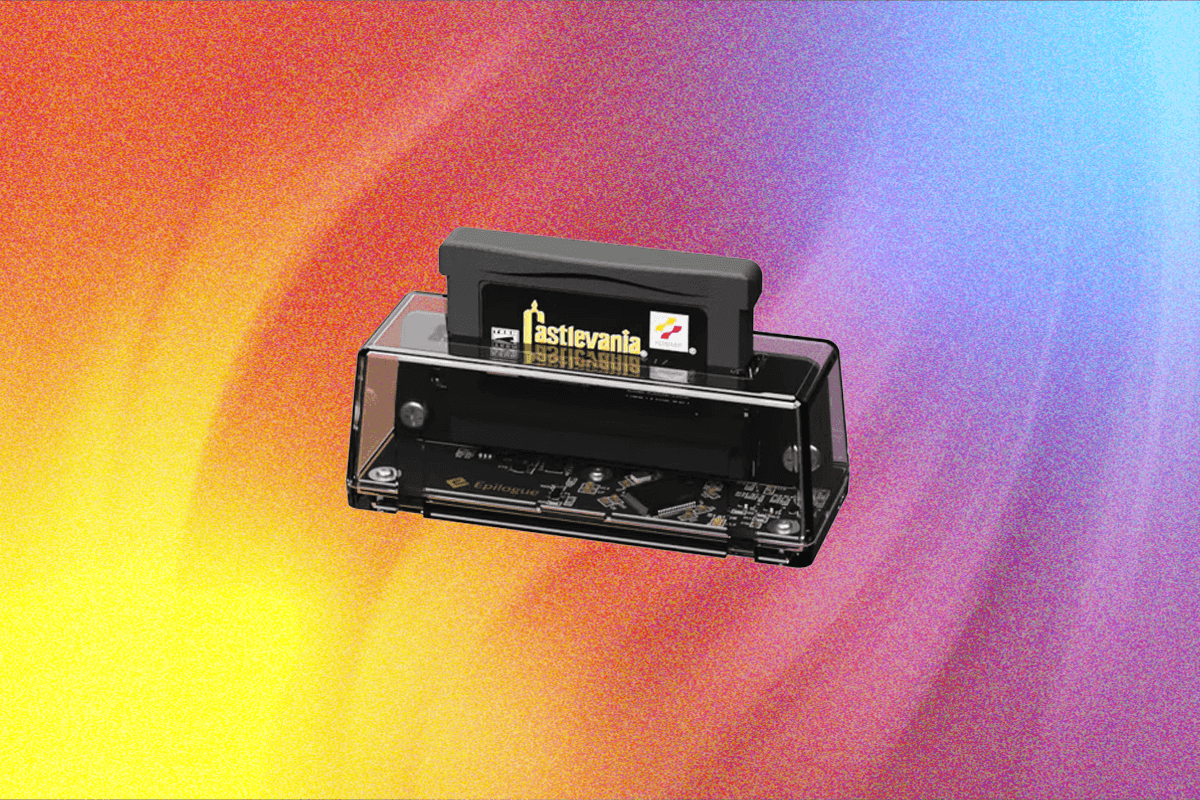
Epilogue’s innovative GB Operator, an endearing plug-in device, is revolutionizing how enthusiasts engage with their cherished Nintendo Game Boy, Game Boy Color, and Game Boy Advance game cartridges, effectively turning any laptop into an all-powerful retro gaming station. Priced affordably at just under $50, this compact gizmo offers an accessible and feature-rich solution for experiencing classic handheld titles on a modern display, bridging the gap between aging hardware and contemporary technology.
Key Advantages:
The GB Operator boasts wide compatibility across the entire Game Boy family of cartridges, including original Game Boy, Game Boy Color, and Game Boy Advance titles. It extends its support to various Game Boy accessories, such as the Game Boy Camera, expanding its utility beyond simple gameplay. A standout feature is its robust save data backup and transfer tool, crucial for preserving progress on battery-dependent cartridges. Users also benefit from an exhaustive array of filters, visual tweaks, cheat functionalities, and advanced emulation tools, offering unparalleled customization. All these features come at a remarkably bargain price, making it an attractive option for both casual players and dedicated collectors.
Considerations:
While highly functional, the GB Operator inherently sacrifices the portability and immediate convenience of an actual Game Boy handheld, requiring connection to a computer for operation. The Playback software, while powerful, does not universally retain certain user preferences, such as controller assignments, which may require occasional re-selection. Furthermore, a highly anticipated feature, the ability to create "save states" (virtual snapshots of gameplay at any moment), is not yet implemented, though it is on the development roadmap.

Revisiting a Gaming Legacy
The Nintendo Game Boy console family, launched with the iconic gray monolith in 1989, represented a groundbreaking moment in video game history. It democratized gaming, making it accessible to millions worldwide and establishing Nintendo’s dominance in the handheld market. The Game Boy’s remarkable success stemmed not from superior technology – rivals like Sega’s Game Gear and Atari’s Lynx often boasted more powerful hardware and color screens – but from its robust design, impressive battery life, and, crucially, an unparalleled library of games. It became the birthplace of foundational titles that shaped the medium, from Tetris, still arguably the definitive version of the puzzle classic, to the global phenomenon of Pokémon, which captivated a generation.
However, as the original Game Boy approaches its 40th anniversary, the challenge of playing these important classics intensifies with each passing year. For those who maintain a collection of original, physical Game Boy cartridges in the mid-2020s, viable options have become increasingly limited. One path is to rely on original consoles, with the Game Boy Advance, a comparatively younger 25-year-old system with backward compatibility for original Game Boy and Game Boy Color cartridges, often being the preferred choice. Yet, these consoles are succumbing to the ravages of time; screens degrade, batteries fail, and fewer functioning units remain available. The alternative, until recently, was investing in a third-party field-programmable gate array (FPGA) console, such as the highly acclaimed Analogue Pocket. These devices meticulously replicate the original hardware logic, offering broad compatibility with original carts but come with a significantly higher price tag, primarily catering to hardcore collectors and purists.
This is where Epilogue introduces a compelling third option: the GB Operator. For a price point just under $50, it provides a straightforward, efficient, and feature-rich method to play original Game Boy, Game Boy Color, and Game Boy Advance cartridges directly on a personal computer, making classic handheld gaming more accessible than ever.
Emulation Nation: Seamless Setup and Powerful Software
The GB Operator is precisely as Epilogue bills it: "a cartridge slot for your computer." Unboxing the device reveals an unassuming yet aesthetically pleasing translucent cuboid. Within its clear perspex casing, the circuit board is visible, with the cartridge slot being the sole external indicator of its specialized function. Its diminutive size, measuring approximately 1.3 x 1.2 x 3.5 inches and weighing a negligible 1.5 ounces, makes it remarkably pocketable, although its dependence on a computer negates true handheld portability.

Setting up the GB Operator is remarkably straightforward. Users simply connect it to their computer via the included USB-C cable, which handles both data transfer and power. The next step involves installing the proprietary Playback software, which is widely available for Windows PC, macOS, and Linux operating systems. Once the software is installed and the device is connected, the system is ready for use—no complex drivers or convoluted configurations are required, embodying a true plug-and-play experience.
Upon inserting a Game Boy cartridge, the Playback software automatically detects it. It intelligently recognizes the specific game, identifies its region, and promptly retrieves relevant information, including the game’s cover art and a concise description. A notable feature for collectors is the software’s authenticity check, which Epilogue claims is 97.8 percent accurate. This provides valuable peace of mind, especially given the historical prevalence of knockoff cartridges during the original Game Boy era. The GB Operator distinctly champions the use and preservation of legitimate physical media, aligning with the values of many retro gaming enthusiasts.
Games are rendered through emulation. Epilogue Playback defaults to the popular and highly regarded mGBA emulator core, known for its accuracy and performance. However, users are not restricted to this default; they can select from several other integrated emulator cores or even integrate their own preferred core, offering a degree of flexibility appreciated by those deeply immersed in the retro gaming scene. The software allows users to delve into the intricate settings of game performance, enabling fine-tuning of parameters such as frame skips and audio offsets to optimize the gameplay experience. Crucially, for newcomers to emulation, all options and explanations are presented in refreshingly clear, jargon-free language, ensuring accessibility for all skill levels.
Game Boy IMAX: A New Perspective on Classics
For users primarily interested in simply playing their old games, the technical intricacies can be bypassed entirely. A simple click of the ‘Start’ button is all it takes to embark on a nostalgic journey back to vintage gaming bliss.
%2520(3).png)
The most immediately striking aspect of playing games through the GB Operator is the dramatic transformation in visuals. Whether displayed in a windowed format or full-screen, the experience is a massive leap from the original handheld screens. The original Game Boy and Game Boy Color screens featured a modest 160 x 144-pixel resolution, while the more advanced Game Boy Advance offered a slightly more luxurious 240 x 160-pixel resolution. Compared to modern high-resolution monitors, these pixel counts are minuscule. With the GB Operator, every single pixel meticulously programmed into the original games is rendered and blown up to a colossal size. This expanded scale can initially take some getting used to, but it quickly becomes a delightful experience, allowing players to appreciate the intricate detail and artistry packed into these once-tiny games with unprecedented clarity.
While Game Boy Advance games run essentially as they were intended, showcasing the richness of the 32-bit full-color era, the emulator provides a treasure trove of visual filters specifically designed for original Game Boy games. By default, original Game Boy cartridges load in a more contemporary grayscale palette. However, players have the option to revert to the classic green-and-black aesthetic, accurately replicate the monochrome screens of the Game Boy Pocket, or mimic the distinctive brightness of the Japan-only Game Boy Light. The various color highlights that the Game Boy Color would apply to original Game Boy games are also available, as are the unique filters provided by the Super Game Boy, an adapter that allowed Game Boy cartridges to be played on the Super Nintendo. For those interested in performance metrics, the software also offers an optional frame rate display, consistently showing a reliable 60 frames per second across all tested cartridges, indicating smooth and stable emulation.
Beyond visual enhancements, running cartridges through an emulator opens up possibilities for modern conveniences. Epilogue has integrated support for Retro Achievements, an online platform that allows players to track accomplishments and unlock virtual achievements in older games (though a separate account login is required). The Playback software can also automatically pull up a list of cheats for each cartridge, providing an easy way to enable infinite lives or other game-altering codes – a welcome feature for revisiting challenging titles decades later without frustration. Furthermore, Playback allows for performance and settings to be tailored on a per-game basis, including completely remapping controls to suit individual preferences or accelerating game speed for faster progression. The only minor drawback identified is the software’s occasional failure to remember certain universal settings, such as defaulting to a specific controller input (e.g., an Xbox controller), sometimes reverting to keyboard controls after switching cartridges.
Physical Ephemera: Unparalleled Compatibility and Unique Features
Epilogue’s claim of universal compatibility for the GB Operator is robustly supported. The device has been tested with over a dozen cartridges, encompassing US, European, and Australian releases from all three main Game Boy console generations, successfully recognizing and playing every single one. While some games, such as Sonic Advance 3, took slightly longer to launch (approximately a minute) as Playback loaded them into its emulator, every title attempted eventually ran without issue. Critically, any existing save data on the cartridges was read smoothly, allowing for immediate resumption of past game sessions, such as an endgame boss battle in Treasure’s acclaimed Astro Boy: Omega Factor.
%2520(4).png)
The Operator’s versatility extends to handling some of the more peculiar accessories and experimental titles that graced the Game Boy ecosystem. A notable example is Boktai 2: Solar Boy Django, an experimental title from renowned game designer Hideo Kojima, released for the GBA in 2005. This game incorporated a unique solar sensor directly into the cartridge, requiring players to expose the game to actual sunlight to power up the protagonist’s weapons. With the GB Operator, users can bypass this requirement by configuring the Playback software to simulate a bright day, demonstrating a thoughtful catering to niche game mechanics. Epilogue also states that the device supports accessories like the Game Boy Camera, allowing it to function as a webcam, though this specific feature could not be independently tested.
The primary "downside" to relying on original cartridges, rather than the GB Operator itself, lies in the condition of the carts. Poorly maintained cartridges can be prone to read errors. An instance involved a second-hand Game Boy Color copy of Disney’s Tarzan, which loaded but experienced frequent cut-outs, likely due to eroded physical contacts on the cartridge. For other carts that weren’t immediately recognized, the time-honored (and often effective) ritual of blowing into the cartridge slot resolved the issue.
Preservation Society: Archiving and Development Tools
Beyond simply playing existing physical libraries on a computer, the GB Operator offers significant utility for game preservation and even new game creation. The Playback software includes a crucial feature that allows users to back up a game’s save data directly to their computer. This functionality is invaluable, especially for older cartridges that stored progress locally using internal batteries. Once these batteries inevitably deplete, save files are lost permanently.
A personal experience with a copy of Pokémon Gold highlighted this issue: the internal battery had died, erasing any progress from 2001. While the GB Operator could not recover what was already lost, it underscores the importance of its backup feature. Had the save file still been present, it could have been copied to a laptop’s hard drive, allowing for a battery replacement in the cartridge (a delicate but feasible process) and subsequent restoration of the save data – a truly magical capability for collectors. It is important to note, however, that at present, all save operations rely on the cartridge’s native save processes. The highly anticipated feature of virtual "snapshot" saves, which would allow users to capture a game’s state at any given moment, is on Epilogue’s roadmap and will first be tested through experimental "Nightly Builds" of Playback before full implementation.
%2520(9).png)
The GB Operator also facilitates the dumping of an entire game’s main data from a personally owned cartridge. This allows users to create a legal copy for their own archival purposes, protecting their investment against future cartridge degradation (it is crucial to remember that sharing these dumped ROMs constitutes piracy). The dumping process itself is swift, even for the largest Game Boy Advance games, which typically peaked at 32 MB. However, for continuous play through the Playback software, the GB Operator still requires the original cartridge to be inserted; it cannot load a dumped ROM directly from the computer.
Finally, for aspiring game developers or enthusiasts of retro-style indie games, the GB Operator provides a valuable tool: it allows for the transfer of homebrew games, often created using platforms like GB Studio, onto a flash cart. This enables developers to test and play their creations on an actual Game Boy console, fostering modern creativity built upon the legacy of these beloved handhelds.
Conclusion: An Essential Tool for Game Boy Enthusiasts
It is genuinely challenging to find significant fault with the Epilogue GB Operator. While its inherent lack of true portability – requiring a connection to a computer – might be considered a minor drawback when compared to the original pick-up-and-play nature of handheld consoles, this criticism feels like splitting hairs given its intended purpose and feature set. Ultimately, the device flawlessly delivers on all its promises, all for an incredibly accessible price point of less than $50.
The GB Operator is a marvelous piece of kit, offering robust performance and remarkable utility. Its success bodes extremely well for Epilogue’s announced upcoming SN Operator, which aims to provide similar functionality for Super Nintendo cartridges, and the mysterious "?? Operator" set to follow. For anyone looking for an easy, low-budget, and feature-rich way to revisit, preserve, or revive their cherished Game Boy collection, the Epilogue GB Operator stands out as the definitive best option available today.