 11
11 1
1 2
2 3
3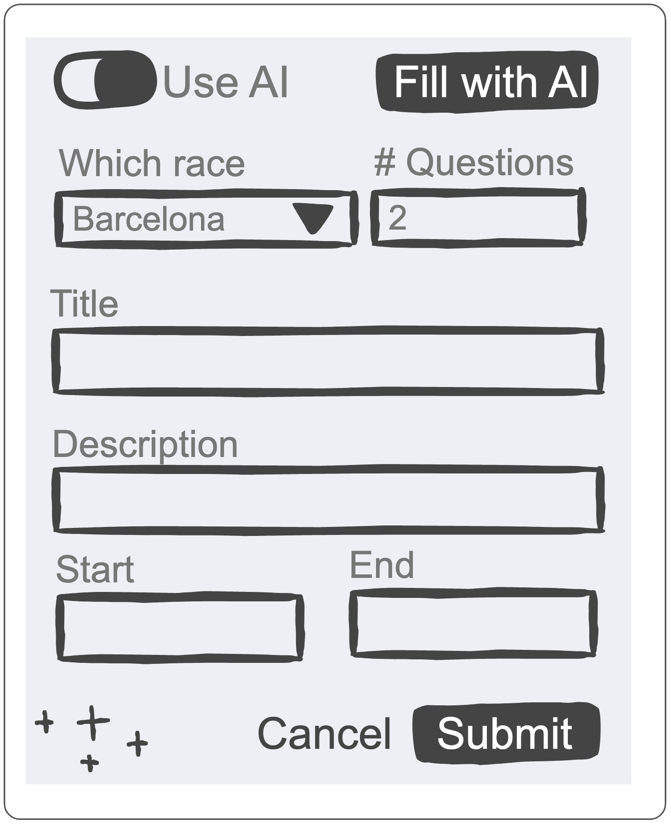
The rapid proliferation of Large Language Models (LLMs) has established the chat-style interface as the de facto standard for human-AI interaction. However, as the initial novelty of conversational AI transitions into a phase of deep integration, software practitioners are identifying significant limitations in the chat-centric model. Recent developments within the Atlassian ecosystem suggest a shift toward more seamless, context-aware user experiences (UX) that move beyond the conversational window to address issues such as context switching, the friction of manual data entry, and the complexities of prompt engineering.
Industry experts argue that while chat interfaces are versatile, they are often suboptimal for structured tasks. The reliance on a separate chat module frequently forces users to toggle between their primary workspace and the AI interface, leading to "context switching"—a cognitive burden that reduces productivity. Furthermore, the manual process of copy-pasting information between the AI and the application, combined with the need for users to master "prompt crafting," creates a barrier to efficient software use. To overcome these pitfalls, developers are now exploring ways to embed AI directly into existing workflows, allowing the technology to act as an invisible or assistive layer rather than a separate entity.
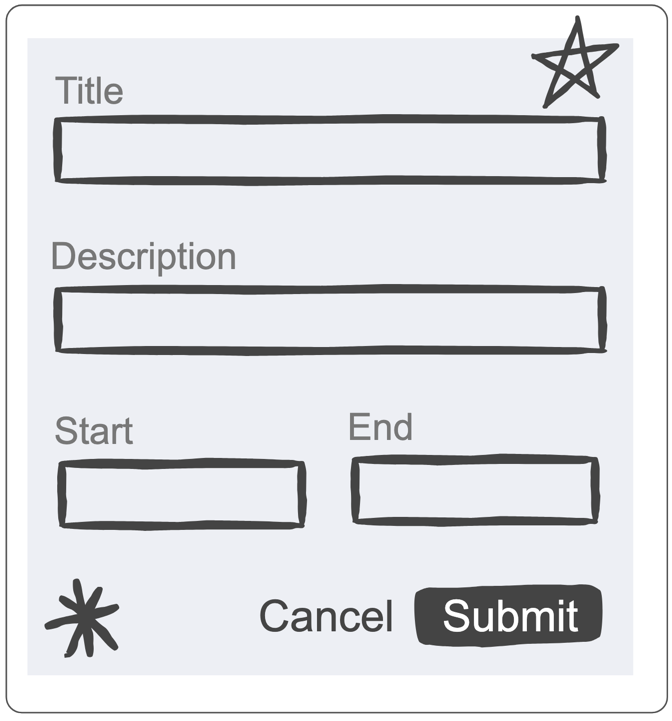
A primary example of this evolution is a new application developed for Atlassian’s Workplace Events team using the Forge platform. Atlassian Forge is a cloud-based development platform that allows developers to build and run apps integrated with Atlassian products. The Workplace Events team utilizes a specific administrative interface to organize and manage internal competitions. Traditionally, setting up these events required the manual completion of extensive forms, including fields for competition titles, detailed descriptions, and precise start and end dates and times.
The administrative burden of these forms led to the development of an AI-assisted feature designed to streamline the data entry process. Recognizing that the full form was time-consuming to complete, the developer introduced a "Fill with AI" functionality. This feature is accessible via a toggle at the top of the administrative interface, which reveals a set of simplified AI form-filling controls. Instead of navigating dozens of fields, the user provides a few basic parameters or a brief summary of the event. These guiding inputs are significantly faster to complete than the primary form, yet they provide enough context for the AI to generate a comprehensive draft of the entire event setup.

Technically, this process is powered by the Forge LLM API. When a user engages the “Fill with AI” button, the application sends a structured query to the Large Language Model. This query is not a simple text string; it is a sophisticated bundle of data that includes any existing information already entered into the form, the specific instructions provided in the AI widgets, and additional background context regarding the purpose of the form. To ensure the AI’s output is actionable within the software environment, the query specifically requests a response in JSON (JavaScript Object Notation) format.
By requesting a JSON object where each key corresponds to a specific field in the form, the application can programmatically map the AI’s suggestions directly into the user interface. This eliminates the need for the user to copy and paste text from a chat window into individual text boxes or date pickers. The result is a pre-populated form that the user can then refine.
This implementation aligns with Atlassian’s stated responsible technology principles. A key concern in AI integration is the loss of human agency or the introduction of "black box" automation. The Forge app addresses this by maintaining complete transparency; the user must intentionally trigger the AI filling process. Furthermore, the AI-generated content is presented as a draft, allowing the human administrator to review, edit, or correct any inaccuracies before the final submission. This "human-in-the-loop" approach ensures that while the AI handles the heavy lifting of content generation and formatting, the user retains ultimate control over the data.
Beyond simple form filling, the software development community is identifying broader patterns for AI-driven user experiences. These patterns represent a move toward "proactive" rather than "reactive" AI, where the system anticipates user needs based on the current workspace context. Four primary patterns have been identified as the foundation for this new era of UX design:
This pattern focuses on the transition from unstructured intent to structured data. In many enterprise environments, the barrier to data integrity is the sheer effort required to document information. By allowing users to provide "seed" information and letting the AI extrapolate the necessary details—such as generating a professional description from a three-word title or suggesting logical start and end dates based on a mentioned month—the software reduces the "activation energy" required to complete tasks. This is particularly useful in complex systems like Jira or Confluence, where metadata is crucial for reporting and organization.
Commonly seen in advanced code editors and modern email clients, ghost text completion involves the AI predicting the next several words or lines of text in real-time. Unlike a chat interface, which requires a back-and-forth exchange, ghost text appears inline as a light-grey suggestion that the user can accept by pressing a specific key (such as "Tab"). This pattern minimizes disruption to the user’s flow and is increasingly being applied to long-form documentation, project requirements, and ticket descriptions. It serves as a continuous assistant that helps overcome "blank page syndrome."
This pattern moves AI interaction from a "pull" model (where the user asks for help) to a "push" model (where the system offers help). Proactive triggers analyze the user’s current actions and suggest relevant AI interventions. For example, if a user is drafting a project proposal and mentions a specific budget, the system might automatically offer to generate a cost-benefit analysis table or link to the company’s financial guidelines. These triggers must be designed with high precision to avoid becoming intrusive, ensuring they provide value exactly when the user reaches a point of complexity.
One of the greatest challenges in current AI implementations is the "silo" effect, where the AI only knows what is in the current text box. Memory modularity involves the AI having access to a broader "workspace context." This means the AI understands the relationship between different tasks, documents, and historical data within a specific project or team. If an AI knows the goals of a previous project, it can better assist in filling out a form for a new, related project. This creates a cohesive experience where the AI grows more useful as it "learns" the specific environment and terminology of the organization.
The transition from chat-style interfaces to these integrated patterns represents a significant maturation of AI technology in the workplace. The development of the Workplace Events Forge app demonstrates that when AI is treated as a component of the UI rather than a separate feature, it can dramatically improve efficiency while maintaining high standards of data accuracy.
As these patterns undergo further validation and refinement, the goal remains to create a seamless synergy between human intent and machine execution. The shift away from manual "prompt crafting" toward intuitive, context-embedded controls suggests a future where AI does not feel like a tool we "use," but rather a natural extension of the software itself. Practitioners are encouraged to look at their existing user interfaces and identify areas where structured data entry, repetitive drafting, or context-heavy decision-making could be augmented by these emerging AI UX patterns. While the technology is still evolving, the move toward invisible, integrated AI marks the next frontier in software design.