 11
11 1
1 2
2 3
3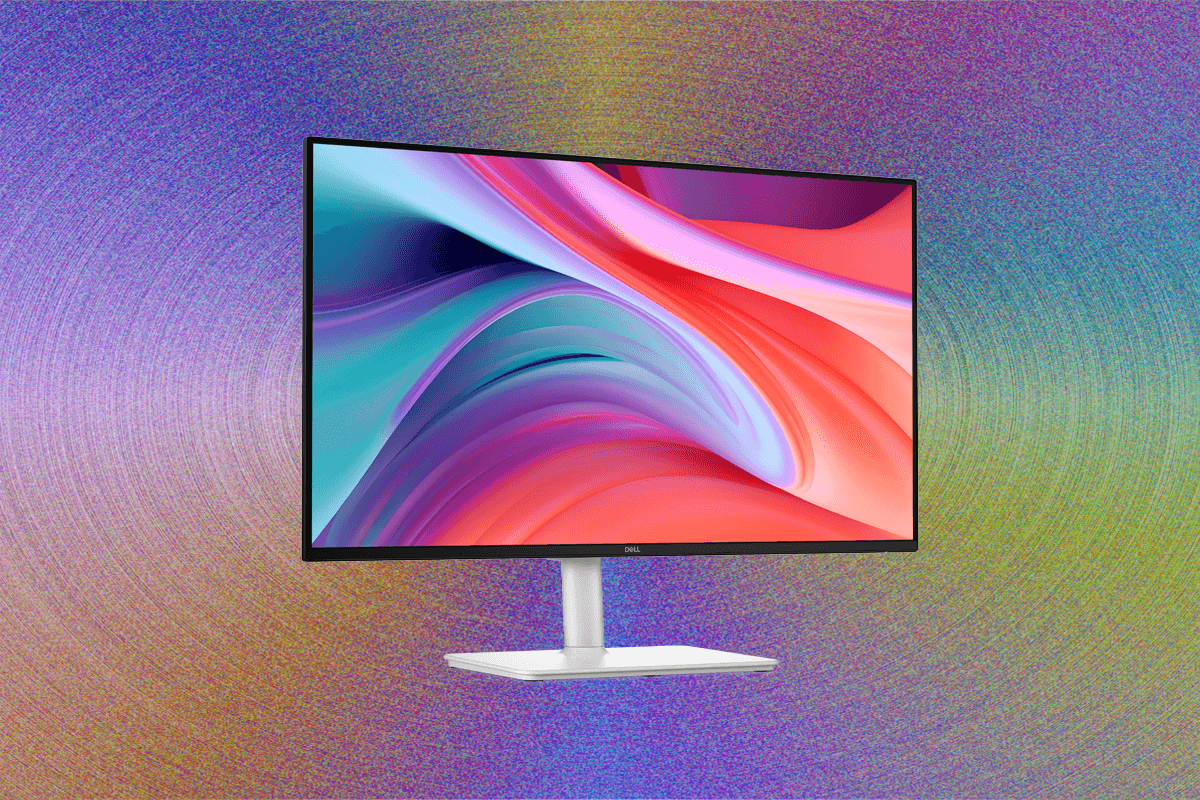
Testing out the latest OLED gaming monitor or an eye-popping 6K monitor is undoubtedly a more enjoyable experience than evaluating more budget-friendly alternatives. However, the reality is that for the vast majority of consumers, the primary desire when purchasing a computer monitor is an affordable option that capably performs its essential functions. These users seek a display that is neither aesthetically unappealing nor functionally frustrating, yet remains well within a reasonable price point.
The market for high-end, cutting-edge monitors receives significant attention from manufacturers, often overshadowing the segment dedicated to cost-effective solutions. Consequently, discovering truly good yet affordable monitors often requires considerable effort and diligent searching. These products are not typically highlighted in major promotional campaigns, making the task of identifying genuinely valuable options in the budget category a nuanced challenge for reviewers and consumers alike.
When navigating the "budget" tier for computer monitors, the general consensus defines this as any display priced under $200. Within this bracket, monitors available for less than $100 almost invariably feature a 1920 x 1080 resolution, commonly known as 1080p. These typically come in screen sizes of 23.8 inches or 27 inches. For those seeking a larger display, even the most inexpensive 32-inch monitors will generally push the price beyond the $100 threshold. For a more comprehensive understanding of monitor selection, a detailed guide on how to choose a computer monitor can provide further insights into various specifications and considerations.
While the sub-$100 price point offers undeniable savings, a slightly higher investment, typically within the $100-$200 range, often unlocks a broader spectrum of features and greater flexibility. This mid-tier budget allows consumers to make strategic trade-offs, such as opting for a higher resolution, incorporating a convenient USB-C hub, benefiting from a higher refresh rate for smoother visuals, or gaining enhanced ergonomic adjustability. It is within this $100-$200 segment that several impressive options have emerged, demonstrating significant value for their price.
Among the standout recommendations in the $100-$200 category, the Dell 27 Plus (S2725HSM) earns particular praise. This monitor builds upon the strengths of its higher-end sibling, the Dell 27 Plus 4K model (S2725QS), which consistently ranks among the best overall monitors. The more affordable S2725HSM retains many of the desirable attributes found in the premium version, including a highly adjustable stand that offers excellent ergonomic flexibility with height and swivel capabilities, a clean and modern sleek white design, and notably solid image quality for its price point.
Priced around $175, and occasionally available on sale for as low as $140, the Dell 27 Plus delivers robust color performance and achieves a respectable brightness level of 300 nits. The monitor’s most significant advantage lies in its stand, which allows for extensive height and swivel adjustments. Furthermore, it incorporates a built-in VESA mount, providing users with the option to attach it to a monitor arm for even greater flexibility, making it a highly practical addition to any workstation setup. The primary limitation of the Dell 27 Plus is its somewhat sparse port selection, featuring only two HDMI inputs. This means users will need to connect additional peripherals directly to their laptops or utilize an external USB hub. Despite this minor drawback, for a full-featured 1080p monitor, the Dell 27 Plus stands out as one of the best choices available in its price bracket.
A direct competitor to the Dell 27 Plus, offering the distinct advantage of a built-in USB hub, is the Samsung Essential Monitor S4. While this monitor has not yet undergone in-person testing, its specifications suggest a comparable offering. It also features a 1080p resolution and boasts height adjustability, all within a similar price range to the Dell. However, a potential trade-off is its advertised brightness, which at 250 nits, is slightly lower than that of the Dell 27 Plus. This could be a consideration for users working in brightly lit environments.
However, the $150 to $200 price point isn’t exclusively limited to 1080p displays. The MSI Pro 27 (MP273QW E14) offers a significant step up in resolution, featuring a 2560 x 1440 display for approximately $190. This MSI monitor not only provides a notably higher pixel density, resulting in sharper images and more screen real estate, but it also delivers truly fantastic image quality. Its color reproduction and clarity are so impressive that it could even be considered suitable for certain content creation tasks or for photographers on a tight budget – an extraordinary feat for a monitor in this price category. Furthermore, it outshines other monitors in this range in terms of brightness, reaching an impressive peak of 427 nits, ensuring visibility even in well-lit rooms.
The primary compromises with the MSI Pro 27 lie in its adjustability and port configuration. It lacks built-in USB ports for connecting peripherals, requiring users to rely on their computer’s ports or an external hub. More significantly, its integrated stand offers no height or swivel adjustments, remaining in a static position. This ergonomic limitation means that if the default height isn’t ideal for a user’s desk, chair, and body posture, an external monitor stand will be necessary to achieve a comfortable viewing angle. While the monitor technically supports VESA mounting, allowing it to be attached to a monitor arm, it does not include the required mount in the box.
The Best Cheap Gaming Monitor
Venturing into the realm of affordable displays also uncovered the Lenovo Legion R27fc-30, a monitor that unexpectedly impressed as an excellent budget-friendly gaming option. While many cheap gaming laptops often feature underwhelming screens, this monitor far exceeded expectations in terms of image quality. It boasts a brightness exceeding 300 nits, and its color performance rivals that of the MSI Pro 27, delivering vibrant and accurate visuals crucial for immersive gaming.
What truly differentiates the Legion R27 is its high refresh rate, which can be cranked up to 280 Hz. This feature is paramount for fast-paced 1080p gaming, ensuring exceptionally smooth motion and reduced input lag, giving competitive gamers a distinct advantage. Additionally, the monitor incorporates a subtle 1500R curve. While not aggressively curved, this gentle curvature provides a slight sense of immersion in games, enhancing the viewing experience without distorting content at this size and aspect ratio.
A particularly unique characteristic of the Legion R27 is its glossy panel, which lacks the typical matte anti-glare layer found on most monitors. Many users, including this reviewer, prefer glossy screens for their superior clarity and sharper image presentation. However, it’s important to acknowledge that glossy panels are more susceptible to glare and reflections. Therefore, if the monitor is positioned near a window or under bright overhead lights, users should be mindful of potential reflections. This monitor also utilizes a VA (Vertical Alignment) panel, which inherently comes with a couple of known issues, most notably limited viewing angles. Moving one’s head significantly off-center can lead to a noticeable loss of perceived color and contrast. For a single user engaged in gaming at a desk, however, this characteristic is unlikely to pose a significant problem, as direct frontal viewing is the norm.
The Best Monitor Under $100
For those who prioritize maximum savings and are aiming for a screen around the $100 mark, sticking with a 23.8-inch display size is generally the most practical approach. While this size might be considered somewhat compact, it can be an excellent fit for smaller desks or workstations where space is at a premium. Within this highly budget-conscious category, the MSI Pro 24 (MP243W E14) stands out as a highly commendable option.
This 23.8-inch IPS monitor, featuring a 1080p resolution, defies the low expectations often associated with ultra-cheap monitors from previous generations by delivering genuinely solid image quality. In terms of color saturation, it achieves an impressive 99 percent coverage of the sRGB color space and 77 percent of the AdobeRGB color space. Its color accuracy is also notable, with a Delta-E score of 1.35. While these metrics may not meet the stringent requirements of professional photo editors or color graders, they are more than adequate for everyday tasks such as email correspondence, document creation, and presentation decks, providing accurate and vibrant colors for general productivity. The monitor also reaches a respectable peak brightness of up to 359 nits, and its contrast ratio is robust at 1,380:1, contributing to clear and distinct visuals. Furthermore, it includes a 144-Hz refresh rate, a significant bonus for a monitor in this price range, making it a surprisingly capable display for casual gaming when needed.
Naturally, as a $99 monitor, the MSI Pro 24 comes with certain compromises. The most prominent of these is its limited adjustability, offering only a basic tilt function. This means that achieving an ergonomically ideal viewing height may necessitate the use of an external monitor stand. Despite this minor ergonomic limitation, the overall quality of the panel and the clean aesthetic of the monitor itself were genuinely surprising, exceeding expectations for its price point. For users who prefer a larger screen without a significant price increase, MSI also offers a nearly identical 27-inch version (MSI Pro 27 MP275W E2) for just an additional $10. This larger model maintains many of the same features but still retains the 1080p resolution.
Ultimately, while the budget monitor segment requires careful consideration of trade-offs, there are indeed excellent options available that deliver remarkable value. However, for those willing to extend their budget slightly further, into the $300 to $400 range, a wider array of premium features and fewer compromises become accessible. These higher-tier recommendations can be found in comprehensive guides dedicated to the best computer monitors, offering an even more refined visual experience.